
Documentation Index

Fetch the complete documentation index at: https://docs.upflow.io/llms.txt

Use this file to discover all available pages before exploring further.

Your collection sometimes cannot wait for the next action to be triggered. End of a billing period, an impromptu phone call to log, new contact to loop in…there are many reasons to complete a reminder prior to its scheduled date. Own your communication and make sure it is mirrored in Upflow with actions out of the blue!

❗Actions out of the blue are only available

  • to a customer’s Assigned users and Admins
  • when they have a positive outstanding amount (null or negative will prevent this option)
  • as long as the next action is not due yet or planned in the next 24hrs if automated.

If the above-mentioned conditions are met, you can complete an action from a customer’s details page: Click on the Remind now button in the top-right corner of the screen. 💡 Alternatively, you will see
  • the clickable next action’s name if one was triggered and assigned to you
  • a non-clickable “action due now” mention if one was triggered and assigned to someone else
  • a non-clickable “No action to do” mention if the customer doesn’t owe you anything

Edit your template

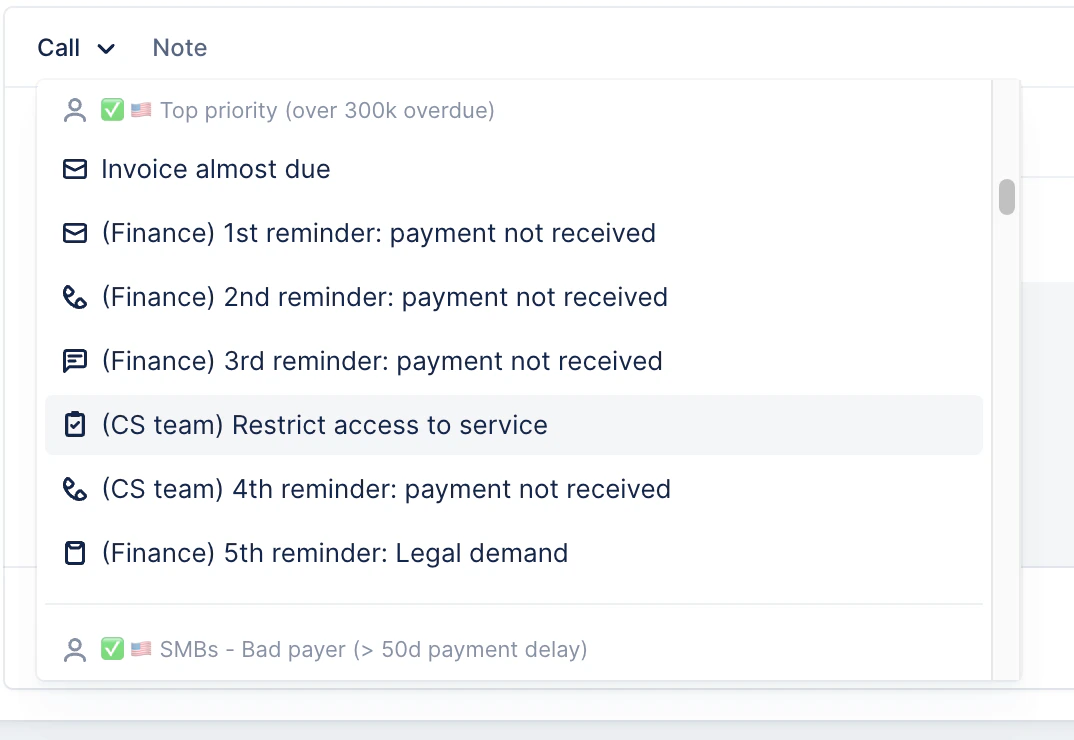
When clicking the Remind now button, you will be redirected to an action editor, landing on an action template from the customer’s assigned workflow (usually the next template scheduled in their workflow): Click on the action type (Call, Email, etc) button to see your templates library and pick the one you’d like to send from any of your workflows. Adjust it as you would when completing a manual action: pick the template you’d like to use and the involved parties, update its content or minute the phone call, and save or send to log it into your customer’s timeline.
What is the impact on the collection

❗ Actions out of the blue are taken into consideration when calculating the next workflow action’s trigger date. They will be updated to meet your workflow’s minimum contact delay. But it will not replace the next action planned by the assigned workflow. FAQ
  • Is it possible to add recipients in cc/bcc when sending an action out of the blue?
Yes. The draft will, by default, add the contacts in cc/bcc from the suggested template. You can add more and/or remove some.