

Why is the same contact as main recipient and cc’d on the same email?
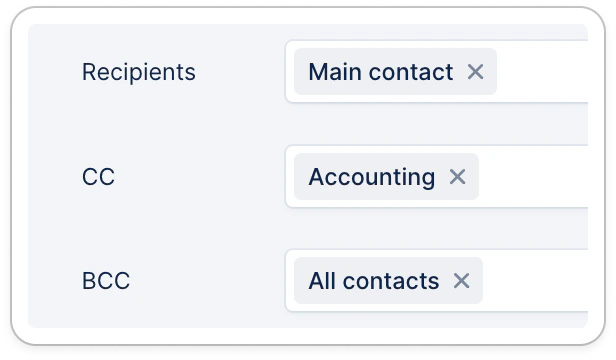
If you notice your contact appears both as main recipient and in cc or bcc within the same email, it might be due to your email template recipients configuration.1 - Either their position is set to be in all multiple fields:
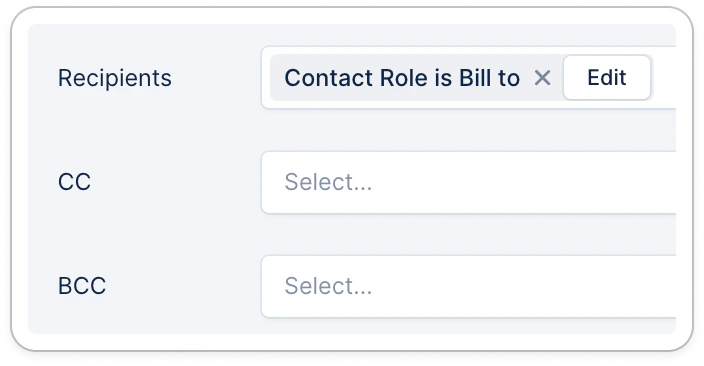
2 - The selected specific position set in your email template could not be found at the customer level:
”This email address is invalid”
This error might occur because your contact’s address isn’t valid anymore or contains a character that is not supported. Only the following characters are supported today for contacts’ email addresses:- Letters: a-zA-Z
- Digits: 0-9
- Some symbols: + _ ’ . -
A contact wasn’t synced from my billing tool
You’re integrated with one of our native integrations and a contact wasn’t synced into Upflow? First check their format as mentioned in the first example above, for any unsupported character. Or refer to the dedicated contact article based on your Integration.API contact import fail
You’re trying to create/import a contact via API, but are getting an error. Please submit a support request at the top and provide:- The exact error you’re getting when sending your API call
- Your API call details (preferably in code, but you can also share a screenshot additionally)
- Your contact and customer details