The HubSpot integration is currently in beta. Contact our support team to request access.

How does it work?

Once HubSpot and Upflow are connected, you can export collection data from Upflow to HubSpot so your team sees each customer’s AR situation right inside their CRM. Only information stored at the customer level can be exported, and it’s written to the corresponding HubSpot company. To export a field:
  1. Create the destination property on the company object in HubSpot.
  2. Back in Upflow, the property becomes available for mapping after a few minutes.
  3. Map the Upflow field to the HubSpot property and save — the sync starts.

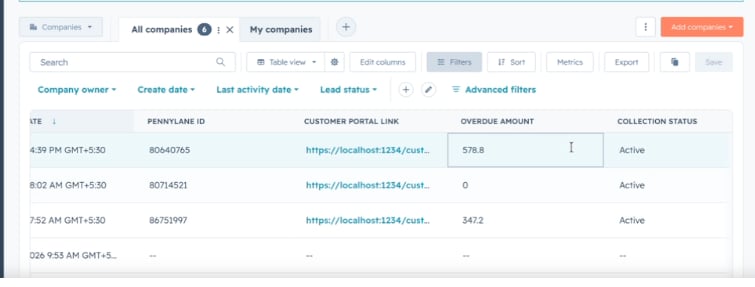
If you disable a field’s sync in Upflow, the property is no longer updated — but it isn’t deleted in HubSpot. The Configure your HubSpot integration step mapping Upflow fields to HubSpot company properties for export. Your AR data then appears on the matching HubSpot company, alongside your CRM data. A HubSpot company list showing the customer portal link, overdue amount, and collection status exported from Upflow.

Customer fields available for export

These are the same fields Upflow writes back for the Salesforce integration.
FieldDescriptionHubSpot property type
Outstanding amountOutstanding amount in the org currencyNumber
Overdue amountOverdue amount in the org currencyNumber
Due amountDue amount in the org currencyNumber
Overdue countNumber of overdue invoicesNumber
Due countNumber of due invoicesNumber
Average payment delayAverage payment delay in daysNumber
RatingCustomer ratingSingle-line text
Collection statusActive or PausedSingle-line text
Customer portal URLLink to the customer portalMulti-line text
Customer details page URLLink to the customer page in UpflowMulti-line text or URL
Saved payment methodSaved payment method typeSingle-line text
Saved payment method statusLast payment status of the saved payment methodSingle-line text
Text custom fieldA text customer custom fieldSingle-line or multi-line text
Select custom fieldA single-select customer custom fieldDropdown select
Multi-select custom fieldA multi-select customer custom fieldMultiple checkboxes
Date custom fieldA date customer custom fieldDate picker
Boolean custom fieldA true/false customer custom fieldSingle checkbox
Number custom fieldA number customer custom fieldNumber
The Customer portal URL is refreshed periodically so the link your team opens from HubSpot stays valid. All other fields update automatically as your AR data changes in Upflow.