> ## Documentation Index
> Fetch the complete documentation index at: https://docs.upflow.io/llms.txt
> Use this file to discover all available pages before exploring further.
# Xero and Upflow: FAQ
> Common Xero integration questions answered: how to disconnect, reconnect, manage sync issues, and resolve write-back errors between Xero and Upflow.
 You use our Xero integration in Upflow, please find below the most frequently asked questions. Anything's missing? Submit a Support request to let us know, so we can assist you and update this article.
### How do I disconnect Upflow from Xero?
To disconnect your Xero account, go to your Upflow Settings > Integrations and click "Disconnect Xero".
### How to reconnect Xero?
Your Xero instance was disconnected from Upflow and you see the following banner in Upflow?
You use our Xero integration in Upflow, please find below the most frequently asked questions. Anything's missing? Submit a Support request to let us know, so we can assist you and update this article.
### How do I disconnect Upflow from Xero?
To disconnect your Xero account, go to your Upflow Settings > Integrations and click "Disconnect Xero".
### How to reconnect Xero?
Your Xero instance was disconnected from Upflow and you see the following banner in Upflow?
 This can be due to a temporary issue, a manual disconnection, or a change related to the user linked to the integration in Xero (such as their deletion, for example).
Click the Reconnect button from the banner or from your [Settings > Integrations](https://app.upflow.io/organization/-/settings/integrations) page.
You'll be redirected to your Xero instance.
Make sure the user clicking Reconnect is Admin in Xero.
### How often is my data synchronized?
The initial synchronization can take up to a few hours, however when the latter is done, the synchronization will happen in real-time up to a few minutes. Everything you do on Xero will shortly be reflected in Upflow.
### What are the synchronization issues that may arise?
If you’re seeing this indicator in your customer detail page or list view, it means that the customer in question is off balance.
This can be due to a temporary issue, a manual disconnection, or a change related to the user linked to the integration in Xero (such as their deletion, for example).
Click the Reconnect button from the banner or from your [Settings > Integrations](https://app.upflow.io/organization/-/settings/integrations) page.
You'll be redirected to your Xero instance.
Make sure the user clicking Reconnect is Admin in Xero.
### How often is my data synchronized?
The initial synchronization can take up to a few hours, however when the latter is done, the synchronization will happen in real-time up to a few minutes. Everything you do on Xero will shortly be reflected in Upflow.
### What are the synchronization issues that may arise?
If you’re seeing this indicator in your customer detail page or list view, it means that the customer in question is off balance.
 #### Other discrepancies
If there is an issue un-flagged, please submit a Support request, including the customer/invoice/payment references, and screenshots from Xero for as much context and insights as possible.
### Why is a customer or contact missing from Xero?
In XERO, [*contacts*](https://developer.xero.com/documentation/api/accounting/contacts) have `isSupplier` and `isCustomer` flags to identify whether contact is a customer or supplier. In Upflow, we don't sync any contact with `isCustomer=false` or that is archived in XERO.
If a specific contact is supplier only, then `isCustomer` will be false by default for it and hence, will not be imported into Upflow.
You can choose to mark a contact both as supplier and customer, in that case we will import it.
**How contacts are marked as supplier or customer?**
* if contact has account receivable invoices then `isCustomer=true`
* If contact has account payable invoices, then `isSupplier=true`
* If contacts have both type of invoices, both supplier and customer flags will be set to `true`
**Short summary -** we don't import contacts with **only** account payable invoices (`isSupplier=true`).
### Which phone numbers are imported into Upflow at a customer level?
For now, we only import the phone number filled in the "Mobile" section.
### Payment export error
In your Payments list view, if you notice an Error status under "Xero status", it can be due to diverse reasons. The main one being a synchronization failure:
#### Other discrepancies
If there is an issue un-flagged, please submit a Support request, including the customer/invoice/payment references, and screenshots from Xero for as much context and insights as possible.
### Why is a customer or contact missing from Xero?
In XERO, [*contacts*](https://developer.xero.com/documentation/api/accounting/contacts) have `isSupplier` and `isCustomer` flags to identify whether contact is a customer or supplier. In Upflow, we don't sync any contact with `isCustomer=false` or that is archived in XERO.
If a specific contact is supplier only, then `isCustomer` will be false by default for it and hence, will not be imported into Upflow.
You can choose to mark a contact both as supplier and customer, in that case we will import it.
**How contacts are marked as supplier or customer?**
* if contact has account receivable invoices then `isCustomer=true`
* If contact has account payable invoices, then `isSupplier=true`
* If contacts have both type of invoices, both supplier and customer flags will be set to `true`
**Short summary -** we don't import contacts with **only** account payable invoices (`isSupplier=true`).
### Which phone numbers are imported into Upflow at a customer level?
For now, we only import the phone number filled in the "Mobile" section.
### Payment export error
In your Payments list view, if you notice an Error status under "Xero status", it can be due to diverse reasons. The main one being a synchronization failure:
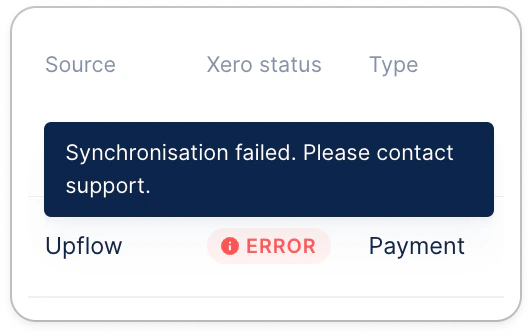 In that case, head to your [Settings > Integrations](https://app.upflow.io/organization/-/settings/integrations) in Upflow, and select the bank account payments should be exported to:
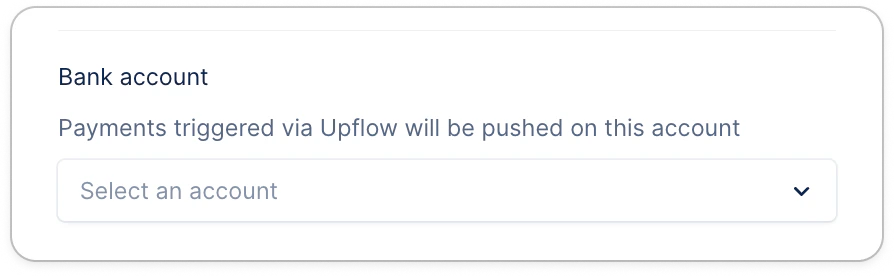 If an account is already selected and is the correct one, please let our Support team know about it, so we can investigate the issue (Submit a Support request at the top).
Once the account is added and saved in your Upflow settings... ⤵
#### Re-export your payments
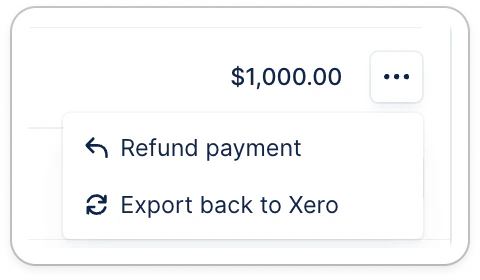
From the payments list view, click the three dots on the payment line, then "Export back to Xero".
If an account is already selected and is the correct one, please let our Support team know about it, so we can investigate the issue (Submit a Support request at the top).
Once the account is added and saved in your Upflow settings... ⤵
#### Re-export your payments
From the payments list view, click the three dots on the payment line, then "Export back to Xero".
 ### Other
As of today, the integration doesn't support:
* Importing expected payment dates on invoices.
### Other
As of today, the integration doesn't support:
* Importing expected payment dates on invoices.