> ## Documentation Index
> Fetch the complete documentation index at: https://docs.upflow.io/llms.txt
> Use this file to discover all available pages before exploring further.
# How to import collection emails in Salesforce?
> Use the Email-to-Salesforce feature to automatically import Upflow collection emails into Salesforce so commercial teams see customer financial context.
Import your collection emails automatically into Salesforce so the commercial team knows the customer's financial situation.
# **How does it work?**
We rely on the [email to salesforce feature](https://help.salesforce.com/s/articleView?id=sf.email_my_email_2_sfdc.htm\&type=5) to import the emails in Salesforce.
Once activated, choose one salesforce user and use its [import email address](https://help.salesforce.com/s/articleView?id=sf.email_my_email_2_sfdc_setup.htm\&type=5) ([emailtosalesforce@xxxxxxx.salesforce.com](mailto:emailtosalesforce@xx.com)) in the Cc or Bcc of the email templates. You can use Cc if you want the customer's replies imported into Salesforce.
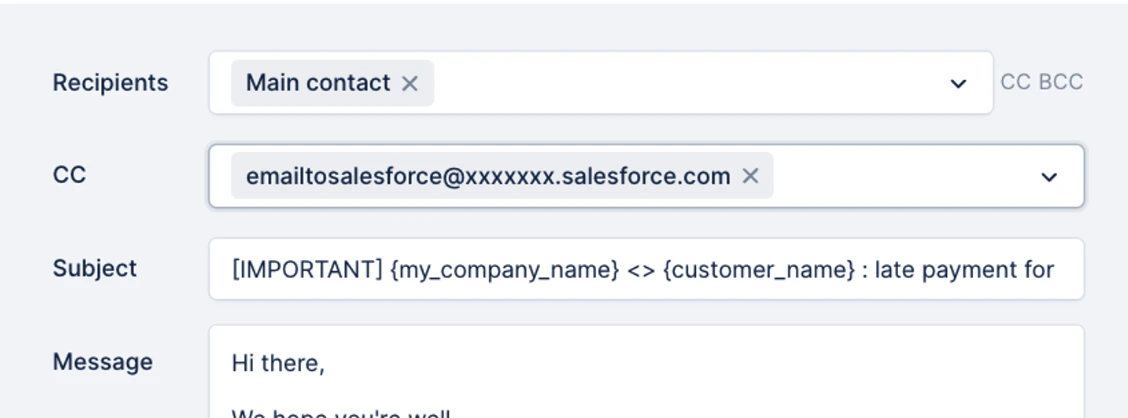 This user must add the Upflow users' addresses as acceptable email addresses.
If you haven't set up email sending from your domain, add "[reminders@upflow-mail.com](mailto:reminders@upflow-mail.com)" to the acceptable list.
This user must add the Upflow users' addresses as acceptable email addresses.
If you haven't set up email sending from your domain, add "[reminders@upflow-mail.com](mailto:reminders@upflow-mail.com)" to the acceptable list.
 Once done, any email sent from Upflow with the import email address attached will be automatically imported into Salesforce.