> ## Documentation Index
> Fetch the complete documentation index at: https://docs.upflow.io/llms.txt
> Use this file to discover all available pages before exploring further.
# Connect Salesforce to Upflow
> Set up the Salesforce integration with Upflow: connection options, importing account owners, contacts and custom fields, and exporting the customer portal link.
Integrating Salesforce with Upflow is a powerful way to enhance your collections process. With this integration, you can seamlessly sync data between Salesforce and Upflow, including customer and contact custom fields, additional contacts, user assignments, and cash collection details. Here’s how to set up the integration and get the most out of it.
In this article, you'll find:
* How to connect Salesforce with Upflow and the three available options
* Additional features such as:
* Importing account owners, contacts, custom fields
* Exporting the Upflow customer portal link to Salesforce
* FAQ
# How to connect Salesforce with Upflow
#### Salesforce specificities
Before we start, please take into account that:
* The user doing the integration must be **Admin**\* in Salesforce and Upflow
* A single Salesforce user can only connect up to 5 Upflow organizations, due to a Salesforce limitation. If you have more than 5 Upflow organizations you need to connect to Salesforce, you must use a different admin user for each batch of 5 orgs.
To begin the integration, start from the [CRM section in your Upflow settings](https://app.upflow.io/organization/-/settings/crm).
#### \*Specific permissions
If your company doesn't allow for Admin rights/permissions for integrations/apps, then you can setup specific permissions in Salesforce for Upflow. Please refer to the attached PDF at the bottom of this article.
### Step 1: Select your Salesforce domain and authorize access
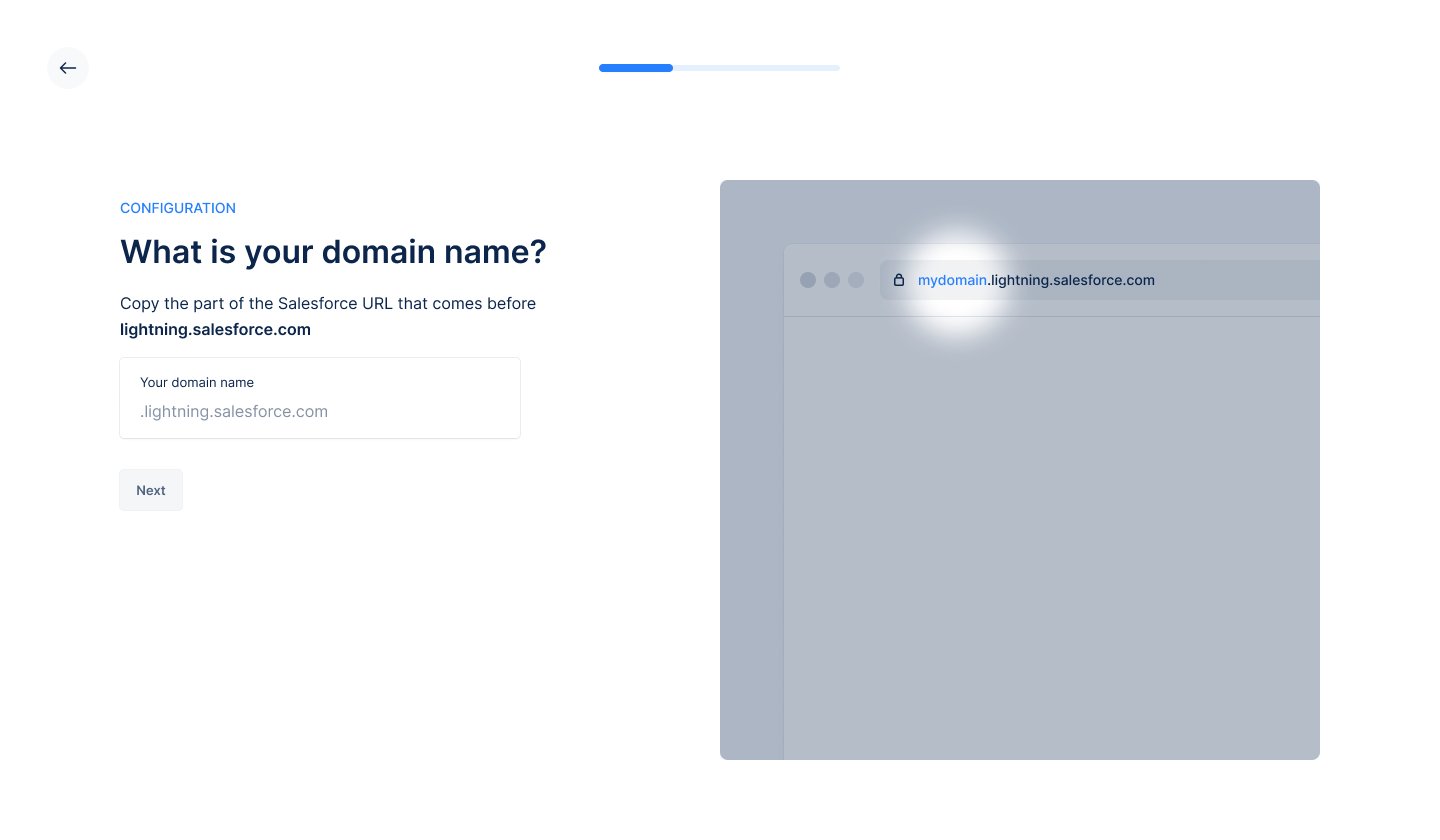
1. Specify the domain of the Salesforce instance you wish to connect to.
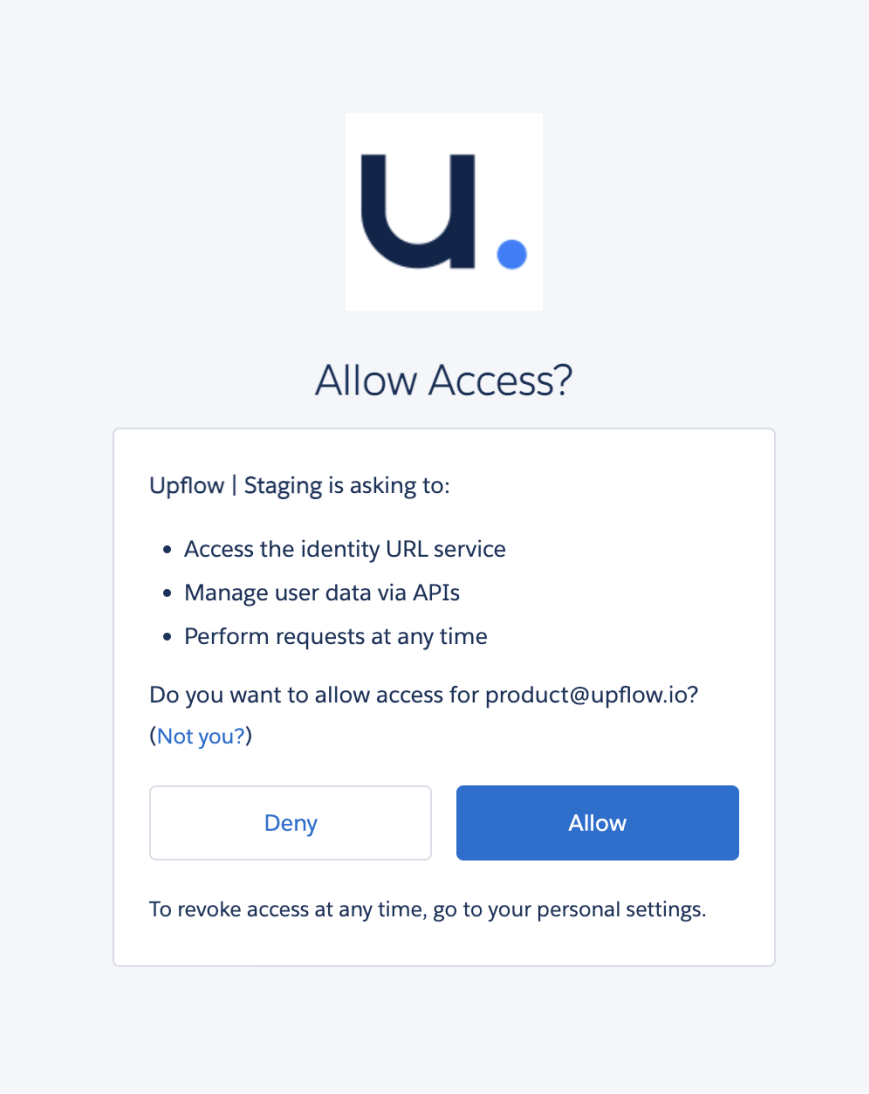
 2. Authorize Upflow to access your Salesforce data. This ensures secure data sharing between the platforms.
 ## Setting up a shared identifier
For seamless synchronization, Upflow requires a **shared identifier** for your customers across Salesforce, Upflow, and your accounting/billing system (e.g., NetSuite, QuickBooks, Chargebee, Stripe Billing, Xero, Sellsy, Zuora). This ensures accurate data mapping.
A 1 \<> 1 mapping is required between your accounting/billing customers and the Salesforce accounts.
Please note we only support 'textarea', 'string', 'reference' SFDC custom field types for the initial connection/integration between Upflow and Salesforce. We do not yet support number type salesforce fields for this step.
### Common identifier scenarios
#### Option 1: Using the Salesforce identifier (`Account Id`)
Here, your Salesforce account is synchronized into NetSuite.
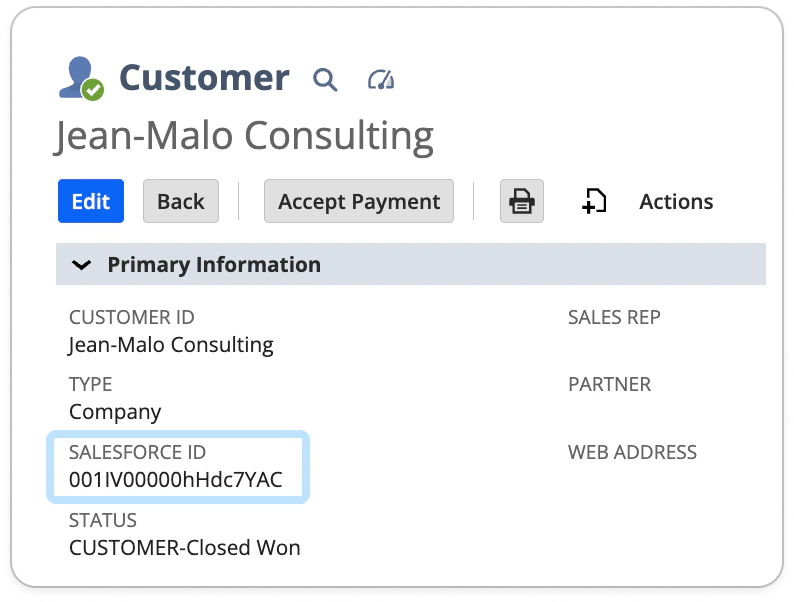
* The `Account Id` is unique to each customer in Salesforce and follows a format like “001IV00000hHdc7YAC.”
* Locate the `Account Id` in the URL of a customer page in Salesforce.
## Setting up a shared identifier
For seamless synchronization, Upflow requires a **shared identifier** for your customers across Salesforce, Upflow, and your accounting/billing system (e.g., NetSuite, QuickBooks, Chargebee, Stripe Billing, Xero, Sellsy, Zuora). This ensures accurate data mapping.
A 1 \<> 1 mapping is required between your accounting/billing customers and the Salesforce accounts.
Please note we only support 'textarea', 'string', 'reference' SFDC custom field types for the initial connection/integration between Upflow and Salesforce. We do not yet support number type salesforce fields for this step.
### Common identifier scenarios
#### Option 1: Using the Salesforce identifier (`Account Id`)
Here, your Salesforce account is synchronized into NetSuite.
* The `Account Id` is unique to each customer in Salesforce and follows a format like “001IV00000hHdc7YAC.”
* Locate the `Account Id` in the URL of a customer page in Salesforce.
 * Ensure it exists in:
| Your accounting system as a custom field. | Upflow as a customer custom field (import it if necessary through the custom fields section). |
| ---------------------------------------------------------------------------------------------------------------------------------------------------------------------------------------------------------------------------------------------------------------------------------------------------------------------------------------------------------------------------------------------------------------------------------------------------------------------------------------------------------------------------------------------------------------------------------------------------------------------------------------------------------------------------------------------------------------------------------------------------------------------------------------------------------------------------------------------------------------------------------------------------------------------------------------------------------------------------------------------------------------------------------------------------------------------------------------------------------------------------------------------------------------------------------------------------------------------------------------------------------------------------------------------------------------------------------------------------------------------------------- | ---------------------------------------------------------------------------------------------------------------------------------------------------------------------------------------------------------------------------------------------------------------------------------------------------------------------------------------------------------------------------------------------------------------------------------------------------------------------------------------------------------------------------------------------------------------------------------------------------------------------------------------------------------------------------------------------------------------------------------------------------------------------------------------------------------------------------------------------------------------------------------------------------------------------------------------------------------------------------------------------------------------------------------------------------------------------------------------------------------------------------------------------------------------------------------------------------------------------------------------------------------------------------------------------------------------------------------------------------------------------------------- |
|
* Ensure it exists in:
| Your accounting system as a custom field. | Upflow as a customer custom field (import it if necessary through the custom fields section). |
| ---------------------------------------------------------------------------------------------------------------------------------------------------------------------------------------------------------------------------------------------------------------------------------------------------------------------------------------------------------------------------------------------------------------------------------------------------------------------------------------------------------------------------------------------------------------------------------------------------------------------------------------------------------------------------------------------------------------------------------------------------------------------------------------------------------------------------------------------------------------------------------------------------------------------------------------------------------------------------------------------------------------------------------------------------------------------------------------------------------------------------------------------------------------------------------------------------------------------------------------------------------------------------------------------------------------------------------------------------------------------------------- | ---------------------------------------------------------------------------------------------------------------------------------------------------------------------------------------------------------------------------------------------------------------------------------------------------------------------------------------------------------------------------------------------------------------------------------------------------------------------------------------------------------------------------------------------------------------------------------------------------------------------------------------------------------------------------------------------------------------------------------------------------------------------------------------------------------------------------------------------------------------------------------------------------------------------------------------------------------------------------------------------------------------------------------------------------------------------------------------------------------------------------------------------------------------------------------------------------------------------------------------------------------------------------------------------------------------------------------------------------------------------------------- |
|  |
| 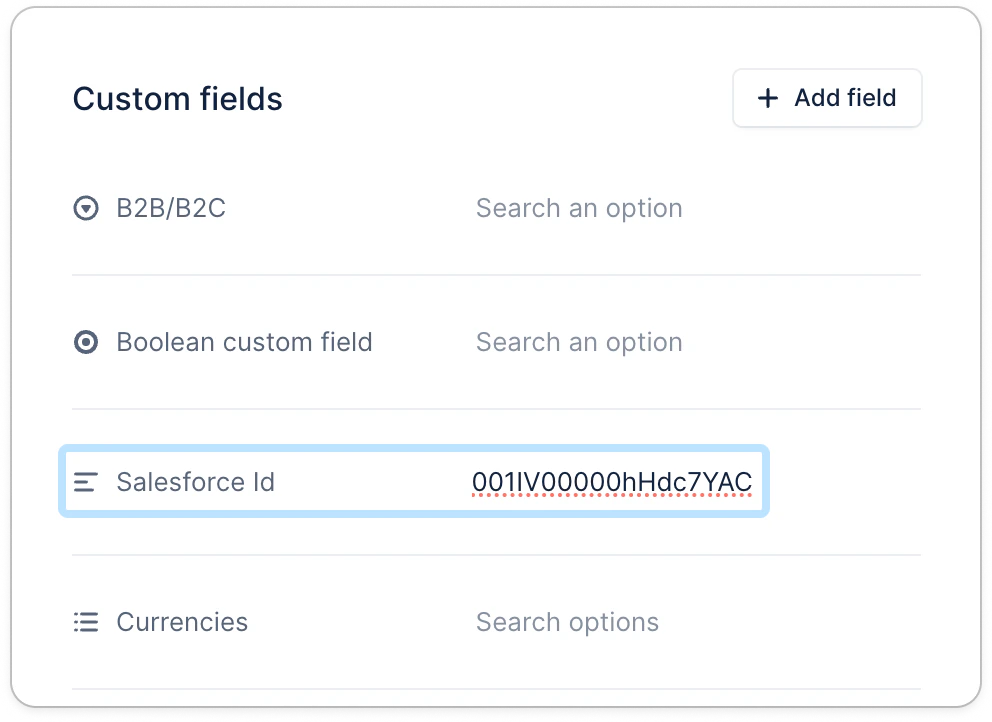 |
* **Field Mapping Example:** Select the corresponding fields in Upflow for mapping, such as `Account Id` in Salesforce and the respective field in your accounting software.
|
* **Field Mapping Example:** Select the corresponding fields in Upflow for mapping, such as `Account Id` in Salesforce and the respective field in your accounting software.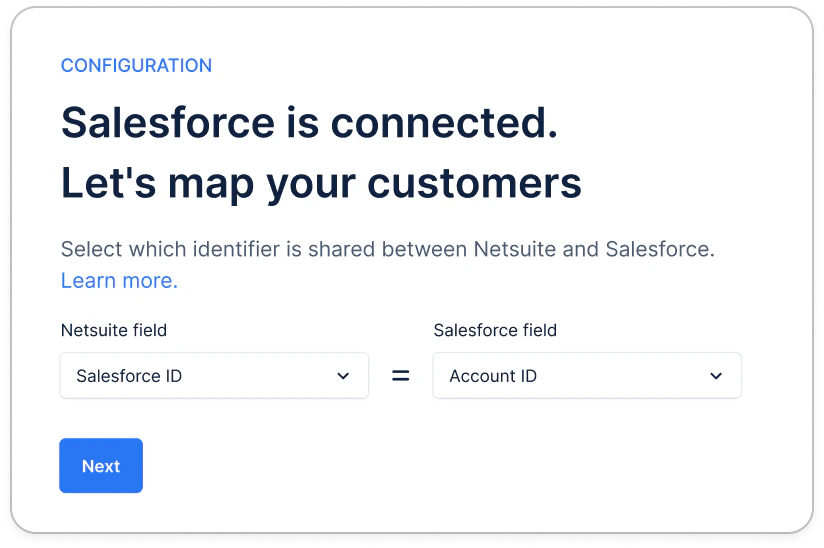 #### Option 2: Using the \_NetSuite\*\_ identifier (*`NetSuite Id`*) -\* or any other billing tool
Here, your NetSuite account is synchronized into Salesforce.
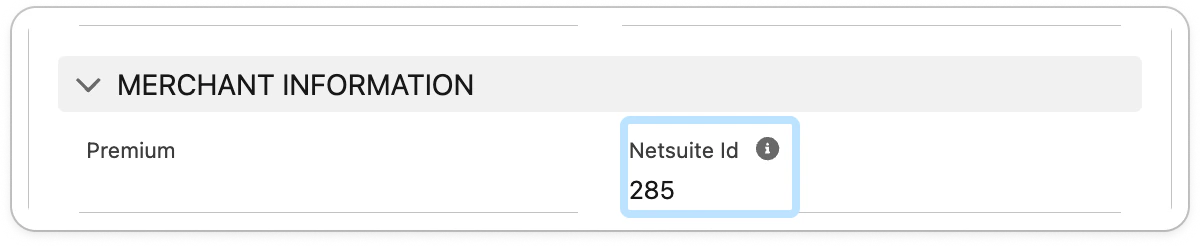
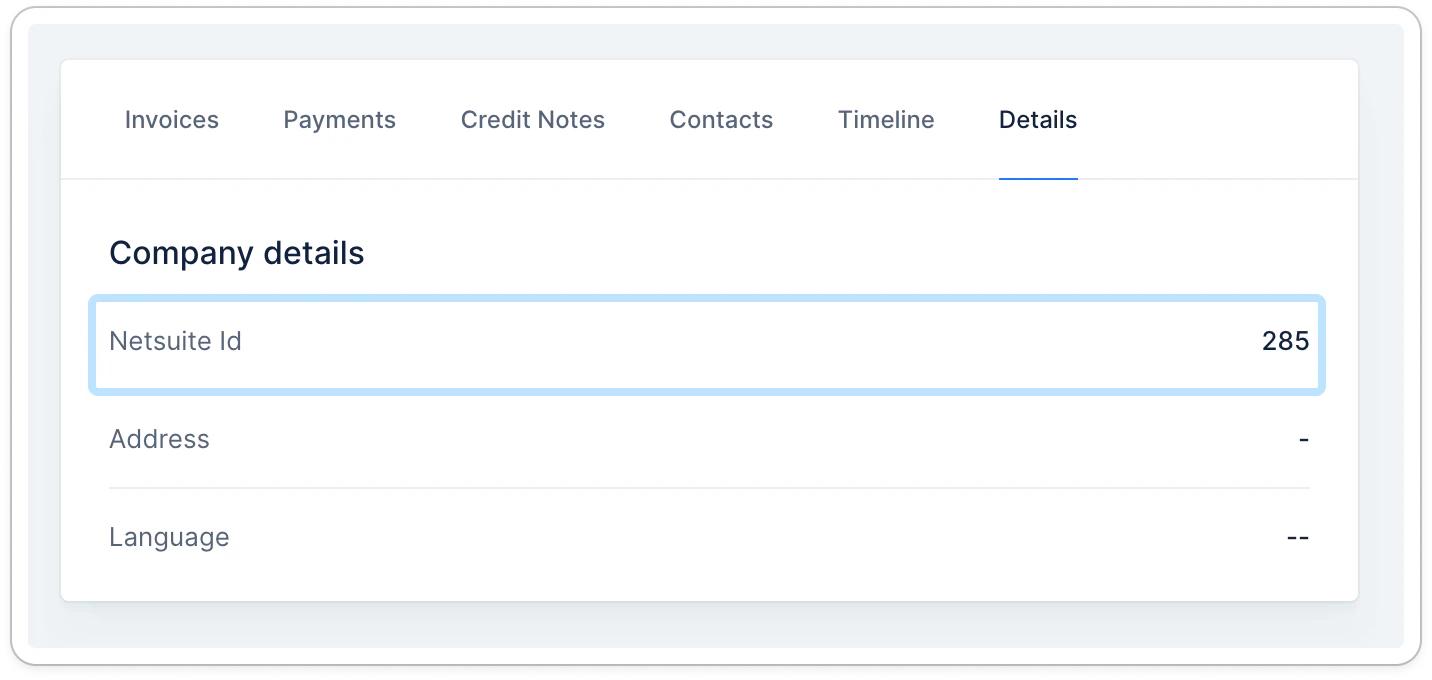
* The `NetSuite Id` is unique to each customer in NetSuite, formatted like “285.”
* Locate it in the URL of a customer page in NetSuite.
#### Option 2: Using the \_NetSuite\*\_ identifier (*`NetSuite Id`*) -\* or any other billing tool
Here, your NetSuite account is synchronized into Salesforce.
* The `NetSuite Id` is unique to each customer in NetSuite, formatted like “285.”
* Locate it in the URL of a customer page in NetSuite.
 * Ensure it exists in:
| Salesforce as a custom field. | Upflow’s customer details section. |
| ----------------------------------------------------------------------------------------------------------------------------------------------------------------------------------------------------------------------------------------------------------------------------------------------------------------------------------------------------------------------------------------------------------------------------------------------------------------------------------------------------------------------------------------------------------------------------------------------------------------------------------------------------------------------------------------------------------------------------------------------------------------------------------------------------------------------------------------------------------------------------------------------------------------------------------------------------------------------------------------------------------------------------------------------------------------------------------------------------------------------------------------------------------------------------------------------------------------------------------------------------------------------------------------------------------------------------------------------------------------------------------- | ----------------------------------------------------------------------------------------------------------------------------------------------------------------------------------------------------------------------------------------------------------------------------------------------------------------------------------------------------------------------------------------------------------------------------------------------------------------------------------------------------------------------------------------------------------------------------------------------------------------------------------------------------------------------------------------------------------------------------------------------------------------------------------------------------------------------------------------------------------------------------------------------------------------------------------------------------------------------------------------------------------------------------------------------------------------------------------------------------------------------------------------------------------------------------------------------------------------------------------------------------------------------------------------------------------------------------------------------------------------------------------- |
|
* Ensure it exists in:
| Salesforce as a custom field. | Upflow’s customer details section. |
| ----------------------------------------------------------------------------------------------------------------------------------------------------------------------------------------------------------------------------------------------------------------------------------------------------------------------------------------------------------------------------------------------------------------------------------------------------------------------------------------------------------------------------------------------------------------------------------------------------------------------------------------------------------------------------------------------------------------------------------------------------------------------------------------------------------------------------------------------------------------------------------------------------------------------------------------------------------------------------------------------------------------------------------------------------------------------------------------------------------------------------------------------------------------------------------------------------------------------------------------------------------------------------------------------------------------------------------------------------------------------------------- | ----------------------------------------------------------------------------------------------------------------------------------------------------------------------------------------------------------------------------------------------------------------------------------------------------------------------------------------------------------------------------------------------------------------------------------------------------------------------------------------------------------------------------------------------------------------------------------------------------------------------------------------------------------------------------------------------------------------------------------------------------------------------------------------------------------------------------------------------------------------------------------------------------------------------------------------------------------------------------------------------------------------------------------------------------------------------------------------------------------------------------------------------------------------------------------------------------------------------------------------------------------------------------------------------------------------------------------------------------------------------------------- |
|  |
|  |
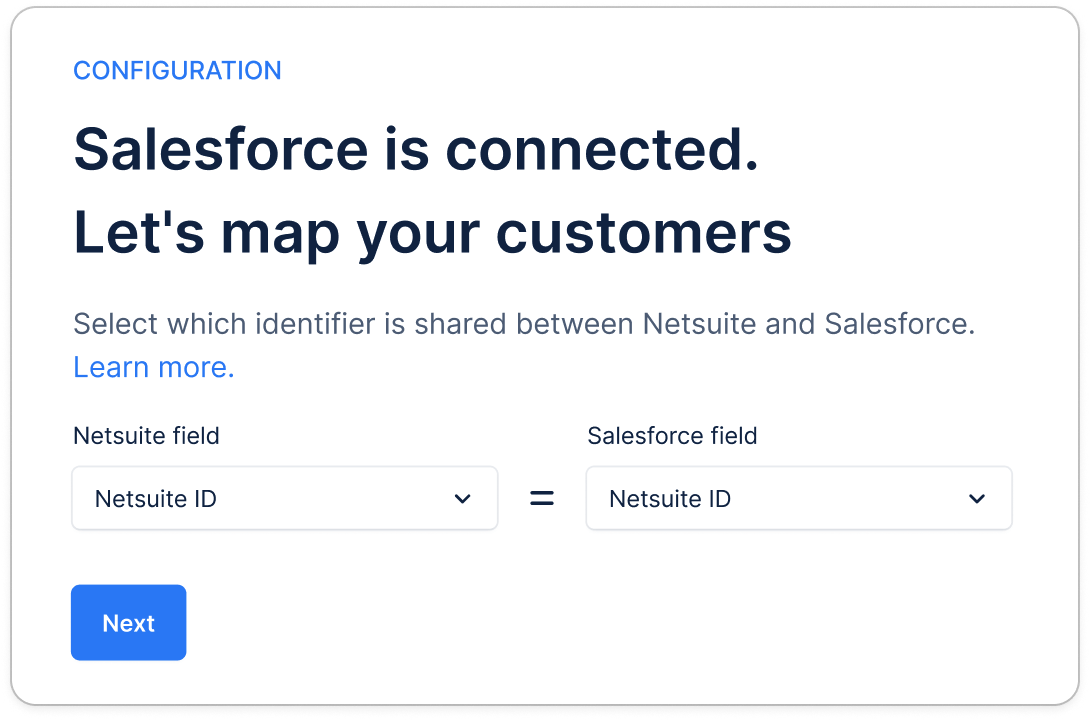
* **Field Mapping Example:** Select `NetSuite Id` as the shared identifier for mapping across platforms.
|
* **Field Mapping Example:** Select `NetSuite Id` as the shared identifier for mapping across platforms.
 #### Option 3: Using another identifier
Here, your billing tool and Salesforce account are not synchronized together.
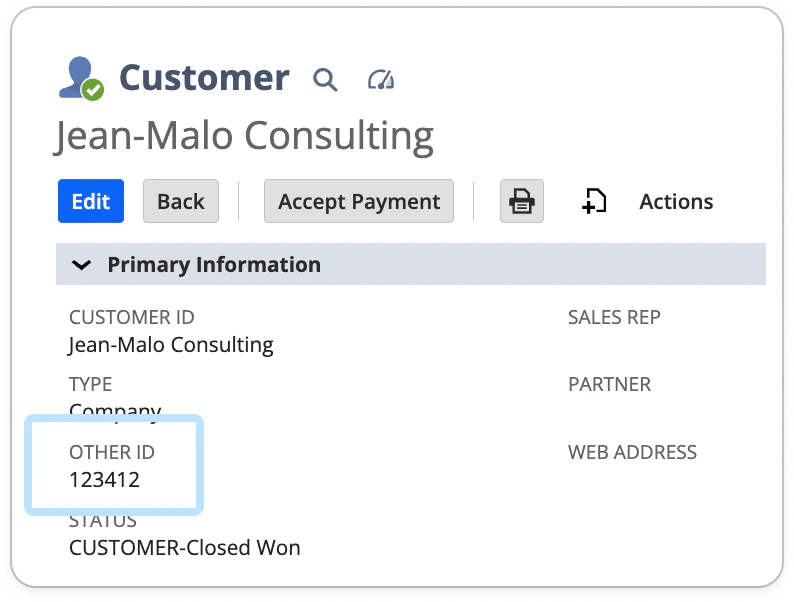
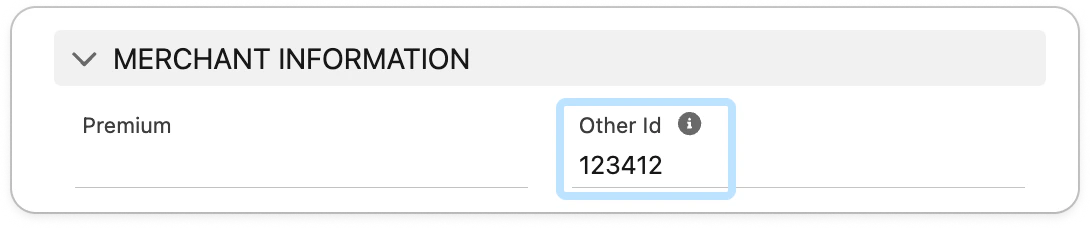
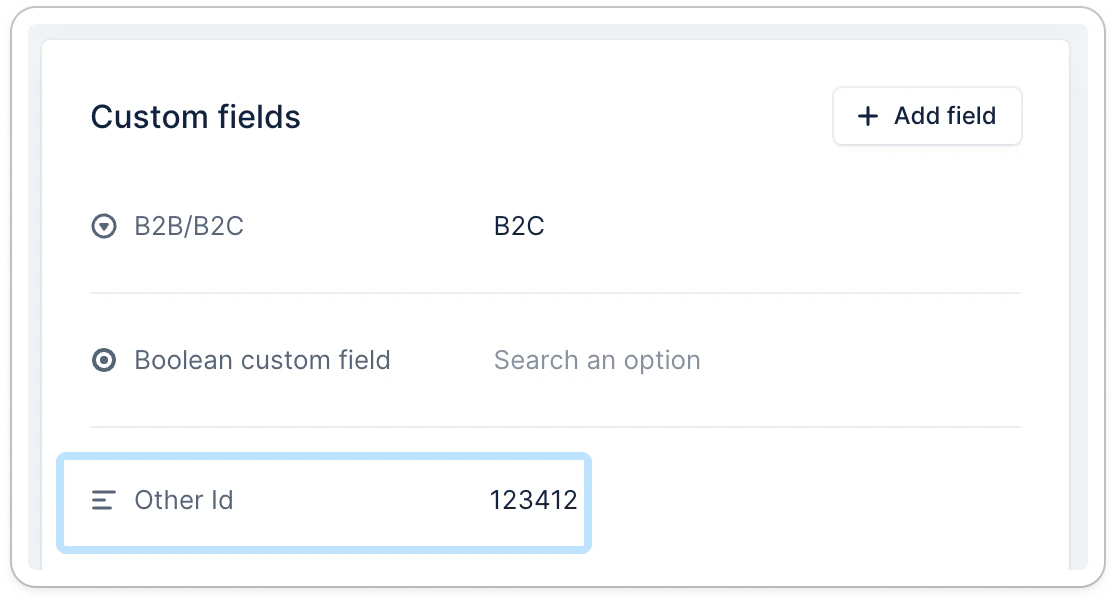
You will need to choose or create a dedicated shared identifier (e.g., app-specific Id, company registration number), ensure it is available in both Salesforce and your billing tool, and [imported to Upflow](https://app.upflow.io/organization/-/settings/custom-fields). Below an example with NetSuite as billing tool:
#### Option 3: Using another identifier
Here, your billing tool and Salesforce account are not synchronized together.
You will need to choose or create a dedicated shared identifier (e.g., app-specific Id, company registration number), ensure it is available in both Salesforce and your billing tool, and [imported to Upflow](https://app.upflow.io/organization/-/settings/custom-fields). Below an example with NetSuite as billing tool:
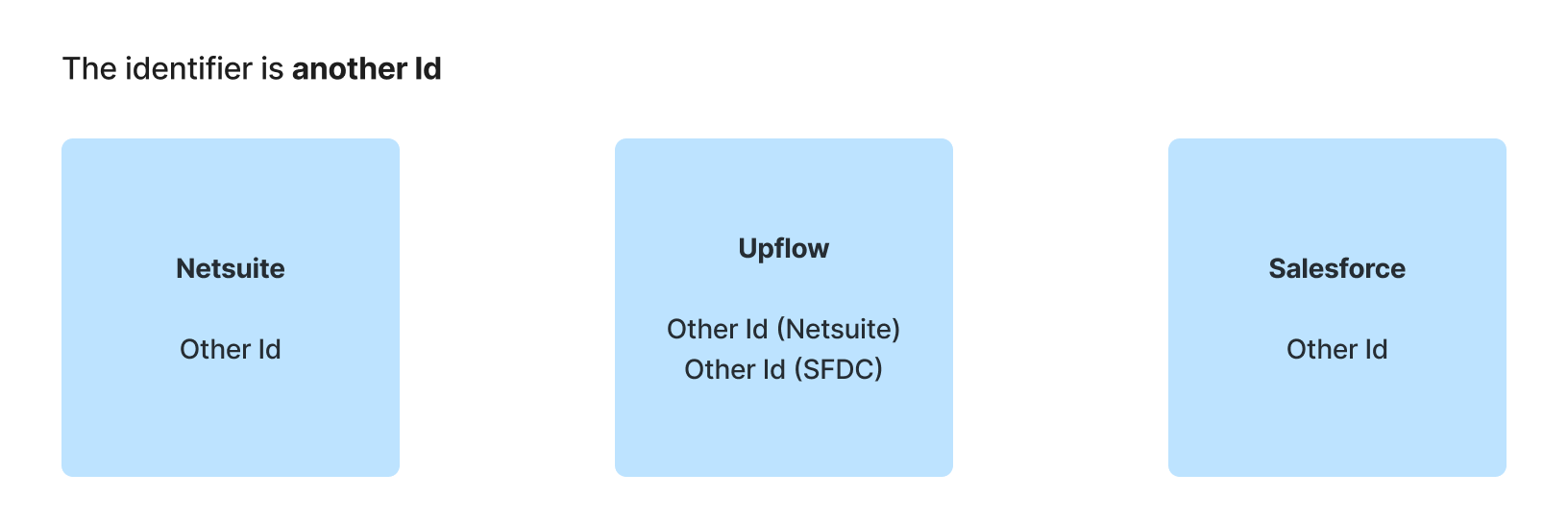 * **Field Mapping Example:** Choose the custom identifier field across all systems for accurate data synchronization:
| In NetSuite | In Salesforce | In Upflow |
| ---------------------------------------------------------------------------------------------------------------------------------------------------------------------------------------------------------------------------------------------------------------------------------------------------------------------------------------------------------------------------------------------------------------------------------------------------------------------------------------------------------------------------------------------------------------------------------------------------------------------------------------------------------------------------------------------------------------------------------------------------------------------------------------------------------------------------------------------------------------------------------------------------------------------------------------------------------------------------------------------------------------------------------------------------------------------------------------------------------------------------------------------------------------------------------------------------------------------------------------------------------------------------------------------------------------------------------------------------------------------------------- | ----------------------------------------------------------------------------------------------------------------------------------------------------------------------------------------------------------------------------------------------------------------------------------------------------------------------------------------------------------------------------------------------------------------------------------------------------------------------------------------------------------------------------------------------------------------------------------------------------------------------------------------------------------------------------------------------------------------------------------------------------------------------------------------------------------------------------------------------------------------------------------------------------------------------------------------------------------------------------------------------------------------------------------------------------------------------------------------------------------------------------------------------------------------------------------------------------------------------------------------------------------------------------------------------------------------------------------------------------------------------------------- | ----------------------------------------------------------------------------------------------------------------------------------------------------------------------------------------------------------------------------------------------------------------------------------------------------------------------------------------------------------------------------------------------------------------------------------------------------------------------------------------------------------------------------------------------------------------------------------------------------------------------------------------------------------------------------------------------------------------------------------------------------------------------------------------------------------------------------------------------------------------------------------------------------------------------------------------------------------------------------------------------------------------------------------------------------------------------------------------------------------------------------------------------------------------------------------------------------------------------------------------------------------------------------------------------------------------------------------------------------------------------------------- |
|
* **Field Mapping Example:** Choose the custom identifier field across all systems for accurate data synchronization:
| In NetSuite | In Salesforce | In Upflow |
| ---------------------------------------------------------------------------------------------------------------------------------------------------------------------------------------------------------------------------------------------------------------------------------------------------------------------------------------------------------------------------------------------------------------------------------------------------------------------------------------------------------------------------------------------------------------------------------------------------------------------------------------------------------------------------------------------------------------------------------------------------------------------------------------------------------------------------------------------------------------------------------------------------------------------------------------------------------------------------------------------------------------------------------------------------------------------------------------------------------------------------------------------------------------------------------------------------------------------------------------------------------------------------------------------------------------------------------------------------------------------------------- | ----------------------------------------------------------------------------------------------------------------------------------------------------------------------------------------------------------------------------------------------------------------------------------------------------------------------------------------------------------------------------------------------------------------------------------------------------------------------------------------------------------------------------------------------------------------------------------------------------------------------------------------------------------------------------------------------------------------------------------------------------------------------------------------------------------------------------------------------------------------------------------------------------------------------------------------------------------------------------------------------------------------------------------------------------------------------------------------------------------------------------------------------------------------------------------------------------------------------------------------------------------------------------------------------------------------------------------------------------------------------------------- | ----------------------------------------------------------------------------------------------------------------------------------------------------------------------------------------------------------------------------------------------------------------------------------------------------------------------------------------------------------------------------------------------------------------------------------------------------------------------------------------------------------------------------------------------------------------------------------------------------------------------------------------------------------------------------------------------------------------------------------------------------------------------------------------------------------------------------------------------------------------------------------------------------------------------------------------------------------------------------------------------------------------------------------------------------------------------------------------------------------------------------------------------------------------------------------------------------------------------------------------------------------------------------------------------------------------------------------------------------------------------------------- |
|  |
|  |
|  |
|
 ### Here's more insights
##### **Step 1: Choose the identifier**
Pick **one** identifier that is:
* **The same value** for the same customer in both systems
* **Unique** (no duplicates)
* **Stable** over time
Ideally, create a TEXT field type in both systems, sharing the same or similar name.
##### **Step 2: Add the field in Salesforce and in your billing tool**
* In **Salesforce (Account level):** create or select a field (Text is usually best), e.g. *Other ID*.
* In your **billing tool (Customer):** create or select the equivalent field.
##### **Step 3: Fill the identifier in both systems**
You can populate and maintain it using any of these methods:
* **Manual updates** (small volumes)
* **API / automation** (recommended at scale for long-term consistency)
##### **Step 4: Make sure the identifier is available in Upflow**
In Upflow, you should be able to sync both fields in your [Settings > Custom fields](https://app.upflow.io/organization/-/settings/custom-fields), at the customer level.
##### **Step 5: Map the fields in the Salesforce setup**
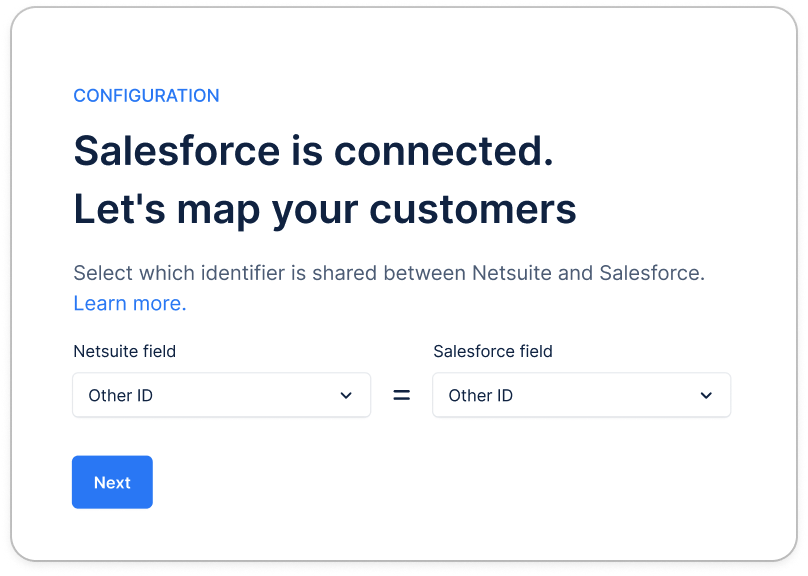
When connecting Salesforce for the first time in Upflow, our system asks you to “map your customers”:
* Select the identifier field on the **billing tool** side
* Select the matching identifier field on the **Salesforce** side
If you've already connected Salesforce to Upflow, but mapped the wrong fields, you can update them at any time from [here](https://app.upflow.io/organization/-/settings/custom-fields). Click on each field's dropdown to select the appropriate fields. Save at the bottom of the page.
Example:
* Other ID (Billing tool) = Other ID (Salesforce)
That’s it. Upflow will use this shared identifier to match the right Salesforce Account to the right Upflow customer.
**Common errors preventing the sync for certain customers:**
* Missing values in one or both systems → no match
* Duplicates → ambiguous match
* Formatting differences (spaces, leading zeros, casing) → mismatch/no match
# Configuring additional features
Upflow’s Salesforce integration offers several customizable features to streamline your workflow.
## Import information from Salesforce
### Here's more insights
##### **Step 1: Choose the identifier**
Pick **one** identifier that is:
* **The same value** for the same customer in both systems
* **Unique** (no duplicates)
* **Stable** over time
Ideally, create a TEXT field type in both systems, sharing the same or similar name.
##### **Step 2: Add the field in Salesforce and in your billing tool**
* In **Salesforce (Account level):** create or select a field (Text is usually best), e.g. *Other ID*.
* In your **billing tool (Customer):** create or select the equivalent field.
##### **Step 3: Fill the identifier in both systems**
You can populate and maintain it using any of these methods:
* **Manual updates** (small volumes)
* **API / automation** (recommended at scale for long-term consistency)
##### **Step 4: Make sure the identifier is available in Upflow**
In Upflow, you should be able to sync both fields in your [Settings > Custom fields](https://app.upflow.io/organization/-/settings/custom-fields), at the customer level.
##### **Step 5: Map the fields in the Salesforce setup**
When connecting Salesforce for the first time in Upflow, our system asks you to “map your customers”:
* Select the identifier field on the **billing tool** side
* Select the matching identifier field on the **Salesforce** side
If you've already connected Salesforce to Upflow, but mapped the wrong fields, you can update them at any time from [here](https://app.upflow.io/organization/-/settings/custom-fields). Click on each field's dropdown to select the appropriate fields. Save at the bottom of the page.
Example:
* Other ID (Billing tool) = Other ID (Salesforce)
That’s it. Upflow will use this shared identifier to match the right Salesforce Account to the right Upflow customer.
**Common errors preventing the sync for certain customers:**
* Missing values in one or both systems → no match
* Duplicates → ambiguous match
* Formatting differences (spaces, leading zeros, casing) → mismatch/no match
# Configuring additional features
Upflow’s Salesforce integration offers several customizable features to streamline your workflow.
## Import information from Salesforce
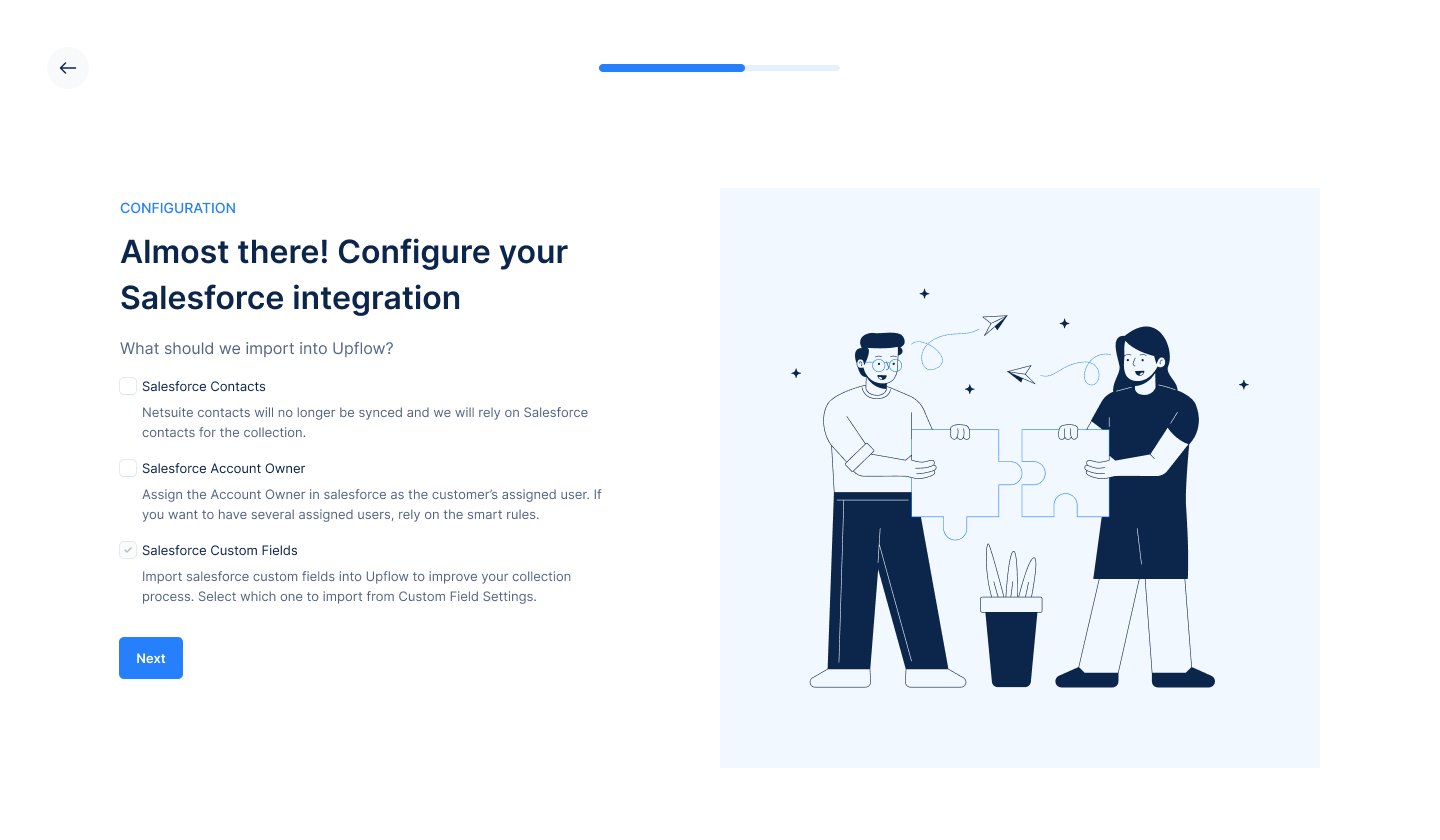 More details are available [here](https://support.upflow.io/hc/en-us/search/click?data=BAh7DjoHaWRsKwiRT%2FmupSE6D2FjY291bnRfaWRpA5ry6zoJdHlwZUkiDGFydGljbGUGOgZFVDoIdXJsSSJgaHR0cHM6Ly9zdXBwb3J0LnVwZmxvdy5pby9oYy9lbi11cy9hcnRpY2xlcy8zNjk5NTQ4ODg5NDg2NS1JbXBvcnQtU2FsZXNmb3JjZS1kYXRhLWluLVVwZmxvdwY7CFQ6DnNlYXJjaF9pZEkiKTI0NmRlZDJkLThmZGMtNDk1Yy1iNDk1LTA0MGU5NmE0NDUwMQY7CEY6CXJhbmtpBzoLbG9jYWxlSSIKZW4tdXMGOwhUOgpxdWVyeUkiD3NhbGVzZm9yY2UGOwhUOhJyZXN1bHRzX2NvdW50aQo%3D--64e58550c6a464914ff64015720e636d61d175ee).
## Exporting information to Salesforce
More details are available [here](https://support.upflow.io/hc/en-us/search/click?data=BAh7DjoHaWRsKwiRT%2FmupSE6D2FjY291bnRfaWRpA5ry6zoJdHlwZUkiDGFydGljbGUGOgZFVDoIdXJsSSJgaHR0cHM6Ly9zdXBwb3J0LnVwZmxvdy5pby9oYy9lbi11cy9hcnRpY2xlcy8zNjk5NTQ4ODg5NDg2NS1JbXBvcnQtU2FsZXNmb3JjZS1kYXRhLWluLVVwZmxvdwY7CFQ6DnNlYXJjaF9pZEkiKTI0NmRlZDJkLThmZGMtNDk1Yy1iNDk1LTA0MGU5NmE0NDUwMQY7CEY6CXJhbmtpBzoLbG9jYWxlSSIKZW4tdXMGOwhUOgpxdWVyeUkiD3NhbGVzZm9yY2UGOwhUOhJyZXN1bHRzX2NvdW50aQo%3D--64e58550c6a464914ff64015720e636d61d175ee).
## Exporting information to Salesforce
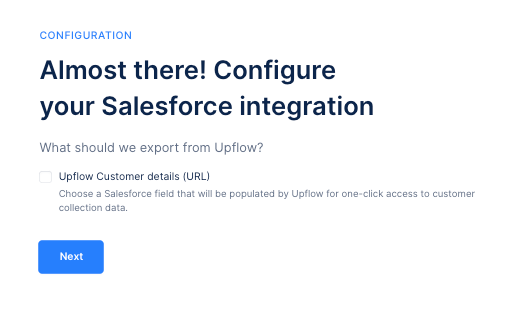 More details are available [here](/en-us/integrations/salesforce/export-data).
## Frequently asked questions
### Salesforce is disconnected from Upflow
More details are available [here](/en-us/integrations/salesforce/export-data).
## Frequently asked questions
### Salesforce is disconnected from Upflow
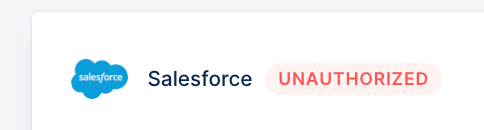 When Salesforce and Upflow are disconnected, it can be due to a change on your end (at the user level - the one used for the initial connexion), or due to a limitation from Salesforce.
As mentioned at the top of this article, a same Admin user can connect the same Salesforce account up to 5 organizations. If you have more than 5 in Upflow, you must split the (re)connection with other Upflow/Salesforce Admin users.
Head to your Upflow CRM settings, and click *Reconnect* (or follow the connection process if not connected before).
When Salesforce and Upflow are disconnected, it can be due to a change on your end (at the user level - the one used for the initial connexion), or due to a limitation from Salesforce.
As mentioned at the top of this article, a same Admin user can connect the same Salesforce account up to 5 organizations. If you have more than 5 in Upflow, you must split the (re)connection with other Upflow/Salesforce Admin users.
Head to your Upflow CRM settings, and click *Reconnect* (or follow the connection process if not connected before).
 ##### If you face any error when attempting to reconnect:
1. Ensure you're Admin in Salesforce and have no restriction there
2. Click *Disconnect* and restart the connection process from scratch (a few minutes)
##### If you face any error when attempting to reconnect:
1. Ensure you're Admin in Salesforce and have no restriction there
2. Click *Disconnect* and restart the connection process from scratch (a few minutes)
 ### How often does Salesforce data sync with Upflow?
Synchronization occurs every 10 minutes, ensuring minimal delay in data updates between Salesforce and Upflow.
### What happens if I disconnect Salesforce?
Disconnecting Salesforce removes all associated contacts and custom fields from Upflow. However, the most recent user assignments remain intact. If needed, you can reconnect Salesforce or switch to a different account.
### Does the Salesforce User I’m connecting with need to be an Admin?
Yes. However, if this is not possible within your company, please refer to the attached PDF below.
### How often does Salesforce data sync with Upflow?
Synchronization occurs every 10 minutes, ensuring minimal delay in data updates between Salesforce and Upflow.
### What happens if I disconnect Salesforce?
Disconnecting Salesforce removes all associated contacts and custom fields from Upflow. However, the most recent user assignments remain intact. If needed, you can reconnect Salesforce or switch to a different account.
### Does the Salesforce User I’m connecting with need to be an Admin?
Yes. However, if this is not possible within your company, please refer to the attached PDF below.