> ## Documentation Index
> Fetch the complete documentation index at: https://docs.upflow.io/llms.txt
> Use this file to discover all available pages before exploring further.
# Pennylane & Upflow
> Connect Pennylane to Upflow with a one-click OAuth flow, then keep customer, invoice, and payment data fresh through incremental syncs every ten minutes.
## Initial Sync
Once you've created your Upflow account, named it, and selected your timezone, click **Connect** under Pennylane, and authorize access to your Pennylane account. Your data will then begin syncing.
After the initial synchronization, Upflow performs incremental syncs every 10 minutes. These syncs only process supported data creations or updates to ensure data accuracy and eliminate discrepancies.
## What data is synced to Upflow
| Pennylane | Upflow |
| ---------------------------------- | --------------------------------------- |
| Customers | ✅ |
| Contacts | ✅ |
| Invoices | ✅ |
| Credit notes | ✅ |
| Unfinalized and cancelled invoices | ✅ |
| Draft invoices | ❌ |
| Archived invoices | ❌ |
| Payments / Refunds | See [Payments](#payments) section below |
| Journal Entries | ❌ |
## Clients
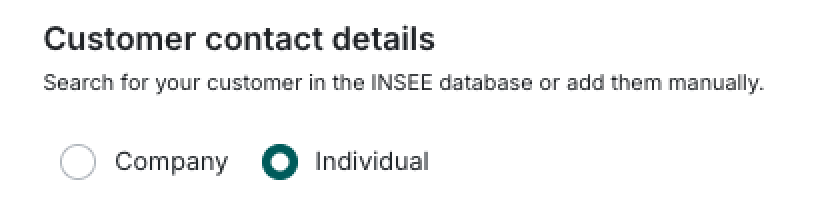
If the customer is a **Company**, the name displayed in Upflow will be based on the **Company** field under **Customer Contact Details**.
If the customer is an **Individual**, the name displayed in Upflow will be based on the **First Name** and **Last Name** fields in that order.
 #### Good to know
* We import the billing postal address to Upflow, which can be used for sending postal mail.
### Native fields synced
Certain native fields are synced to Upflow as custom fields.
| Pennylane | Type in Upflow |
| ------------------ | ---------------- |
| Customer Type | Select |
| Plan Item | Select (Plan ID) |
| Notes | Text |
| Reference | Text |
| Payment conditions | Text |
| Recipient | Text |
## Contacts
We sync contacts found in the "Email address (optional)" field.
#### Good to know
* We import the billing postal address to Upflow, which can be used for sending postal mail.
### Native fields synced
Certain native fields are synced to Upflow as custom fields.
| Pennylane | Type in Upflow |
| ------------------ | ---------------- |
| Customer Type | Select |
| Plan Item | Select (Plan ID) |
| Notes | Text |
| Reference | Text |
| Payment conditions | Text |
| Recipient | Text |
## Contacts
We sync contacts found in the "Email address (optional)" field.
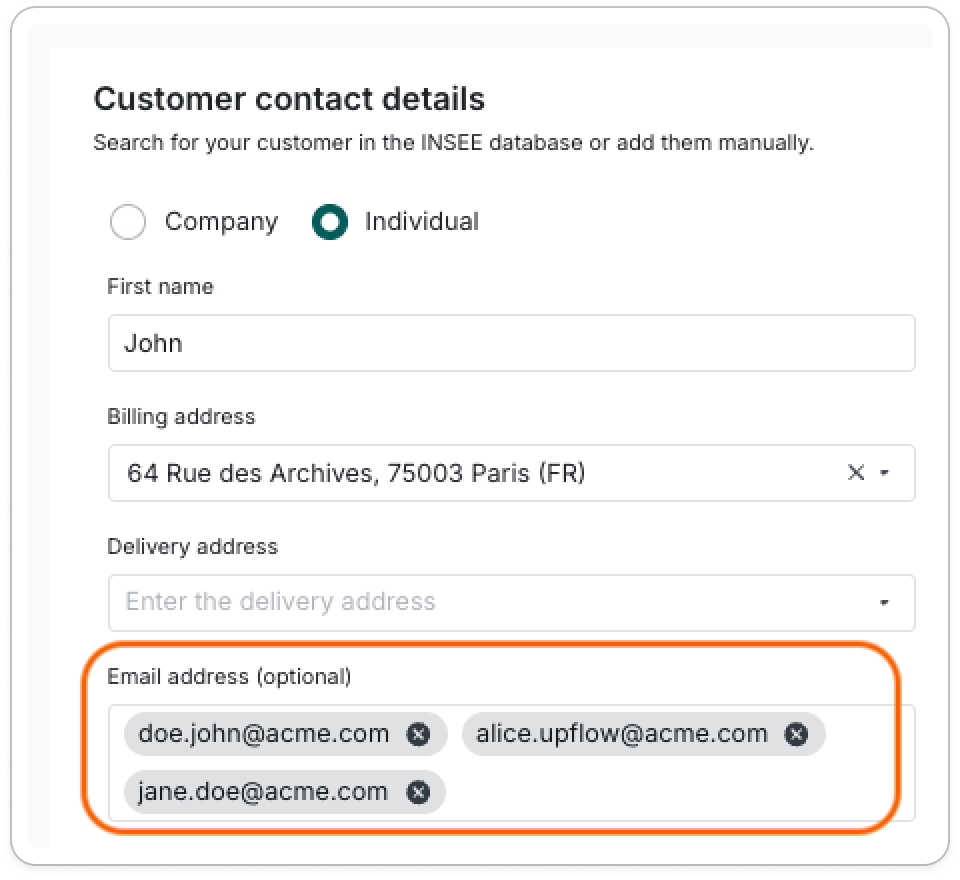 When there are multiple contacts in this field:
* The first one will be considered the primary contact in Upflow
* Here, [john.doe@acme.com](mailto:john.doe@acme.com)
* The following ones as additional contacts
For an individual customer, the customer's first and last names will be added by default to the primary contact in Upflow.
Learn more about contact management: [Your Upflow contacts](/en-us/core-entities/contacts/your-upflow-contacts)
We do not import contacts from the following customer section:
When there are multiple contacts in this field:
* The first one will be considered the primary contact in Upflow
* Here, [john.doe@acme.com](mailto:john.doe@acme.com)
* The following ones as additional contacts
For an individual customer, the customer's first and last names will be added by default to the primary contact in Upflow.
Learn more about contact management: [Your Upflow contacts](/en-us/core-entities/contacts/your-upflow-contacts)
We do not import contacts from the following customer section:
 ## Invoices
The following statues are reflected in Upflow:
| Pennylane | Upflow |
| --------- | ------- |
| Upcoming | Due |
| Late | Overdue |
| Paid | Paid |
The reference, issue and due dates, total and outstanding amounts in Upflow correspond to Pennylane.
👉 If the invoice is cancelled by a credit note in Pennylane, the credit note will be imported to Upflow and linked to the invoice. The invoice will be marked as Paid.
👉 If the invoice is not finalized and cancelled, it is synced to Upflow as "Paid".
⚠️ Reconciliation must be done in the **Management** section of Pennylane, as our integration is **not** connected to the **Accounting** section API. Any data imported, created, or updated in the Accounting section that is not reflected in the Management section cannot be synced to Upflow.
## Credit notes
### Credit notes imported to Upflow
**Note:** Credit notes must be visible in the "Management" section of Pennylane to be imported.
Credit notes from Pennylane are imported under the following conditions:
* Credit notes with status: credit\_note, Overdue, Upcoming, Cancelled, Partially Cancelled, or Partially Cancelled Draft
* Credit notes marked as paid with "Paid" status AND having linked invoices
* Credit notes marked as paid with "Cancelled" status AND having no linked invoices
### Credit notes not imported to Upflow
* Archived, Draft, or Incomplete status → These don't impact customer balance
* Marked as paid with "Cancelled" status AND having linked invoices → These are manually created accounting entries, not real credit notes. Importing them would cause incorrect balances and duplicates
* Marked as paid and unreconciled (without linked invoices) → These are not properly reconciled and would create incorrect unapplied amounts in Upflow.
## Payments
Currently, our integration does not allow importing payments or refunds from Pennylane.
As a workaround, Upflow identifies paid invoices by checking when they were marked as fully paid in Pennylane, and creates a "fix" transaction to correct the invoice and customer balance. The date of this transaction is based on the invoice issue date.
## Invoices
The following statues are reflected in Upflow:
| Pennylane | Upflow |
| --------- | ------- |
| Upcoming | Due |
| Late | Overdue |
| Paid | Paid |
The reference, issue and due dates, total and outstanding amounts in Upflow correspond to Pennylane.
👉 If the invoice is cancelled by a credit note in Pennylane, the credit note will be imported to Upflow and linked to the invoice. The invoice will be marked as Paid.
👉 If the invoice is not finalized and cancelled, it is synced to Upflow as "Paid".
⚠️ Reconciliation must be done in the **Management** section of Pennylane, as our integration is **not** connected to the **Accounting** section API. Any data imported, created, or updated in the Accounting section that is not reflected in the Management section cannot be synced to Upflow.
## Credit notes
### Credit notes imported to Upflow
**Note:** Credit notes must be visible in the "Management" section of Pennylane to be imported.
Credit notes from Pennylane are imported under the following conditions:
* Credit notes with status: credit\_note, Overdue, Upcoming, Cancelled, Partially Cancelled, or Partially Cancelled Draft
* Credit notes marked as paid with "Paid" status AND having linked invoices
* Credit notes marked as paid with "Cancelled" status AND having no linked invoices
### Credit notes not imported to Upflow
* Archived, Draft, or Incomplete status → These don't impact customer balance
* Marked as paid with "Cancelled" status AND having linked invoices → These are manually created accounting entries, not real credit notes. Importing them would cause incorrect balances and duplicates
* Marked as paid and unreconciled (without linked invoices) → These are not properly reconciled and would create incorrect unapplied amounts in Upflow.
## Payments
Currently, our integration does not allow importing payments or refunds from Pennylane.
As a workaround, Upflow identifies paid invoices by checking when they were marked as fully paid in Pennylane, and creates a "fix" transaction to correct the invoice and customer balance. The date of this transaction is based on the invoice issue date.