> ## Documentation Index
> Fetch the complete documentation index at: https://docs.upflow.io/llms.txt
> Use this file to discover all available pages before exploring further.
# Disconnect NetSuite from Upflow
> Stop syncing between NetSuite and Upflow by revoking the Upflow access tokens from your NetSuite account.
To intentionally disconnect NetSuite from Upflow, revoke the Upflow access tokens in your NetSuite account. Once revoked, Upflow can no longer read from or write to NetSuite, and a red disconnection banner appears in each affected Upflow organization.
Use this page when you want to stop the sync on purpose (for example, migrating to a different NetSuite instance or offboarding the integration). If your integration was disconnected unexpectedly and you want to restore it, see [Reconnect NetSuite to Upflow](/en-us/integrations/netsuite/reconnect) instead.
## Before you disconnect
* You need NetSuite admin rights to revoke access tokens.
* Disconnecting stops all NetSuite ↔ Upflow syncing. Data already synced to Upflow stays in Upflow.
* If you sync the same NetSuite account into multiple Upflow organizations, revoking the tokens affects every organization that uses them.
## Revoke the Upflow access tokens in NetSuite
1. In NetSuite, open your **Access Tokens** list.
2. Search for the Upflow integration. If several Upflow entries appear, only the most recent one is in use; the older entries are no longer relevant.
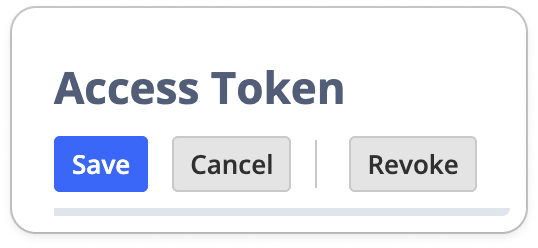
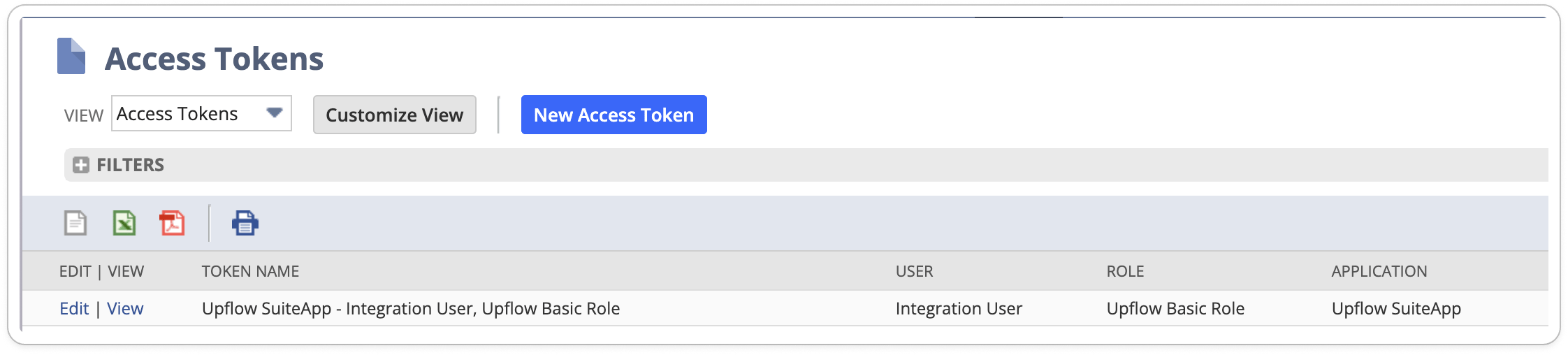 3. Click **Edit** on the active Upflow token, then click **Revoke**.
 ## Confirm the disconnection in Upflow
After the token is revoked, each Upflow organization that used it shows a red disconnection banner:
## Confirm the disconnection in Upflow
After the token is revoked, each Upflow organization that used it shows a red disconnection banner:
 The banner confirms Upflow is no longer syncing with NetSuite.
## Reconnect later
To resume syncing (same NetSuite account or a different one), generate new tokens and add them in Upflow by following [Reconnect NetSuite to Upflow](/en-us/integrations/netsuite/reconnect).
The banner confirms Upflow is no longer syncing with NetSuite.
## Reconnect later
To resume syncing (same NetSuite account or a different one), generate new tokens and add them in Upflow by following [Reconnect NetSuite to Upflow](/en-us/integrations/netsuite/reconnect).