> ## Documentation Index
> Fetch the complete documentation index at: https://docs.upflow.io/llms.txt
> Use this file to discover all available pages before exploring further.
# NetSuite Customers & Contacts
> How NetSuite customers and contacts sync to Upflow, including name resolution, country mapping, customer hierarchy, and contact role handling.
As part of the integration, Upflow imports your customers and contacts directly from NetSuite. This article outlines how this part of the integration functions with regard to your customer hierarchy, contacts and other important details.
The first thing to note is how your customer details from NetSuite are translated in Upflow.
* **Customer name:**
→ If the NetSuite customer has a company name defined, and **is not a person** , we use the company name
→ If a person, we use the “alt” name (if defined)
→ If none of the above, we use the entity id
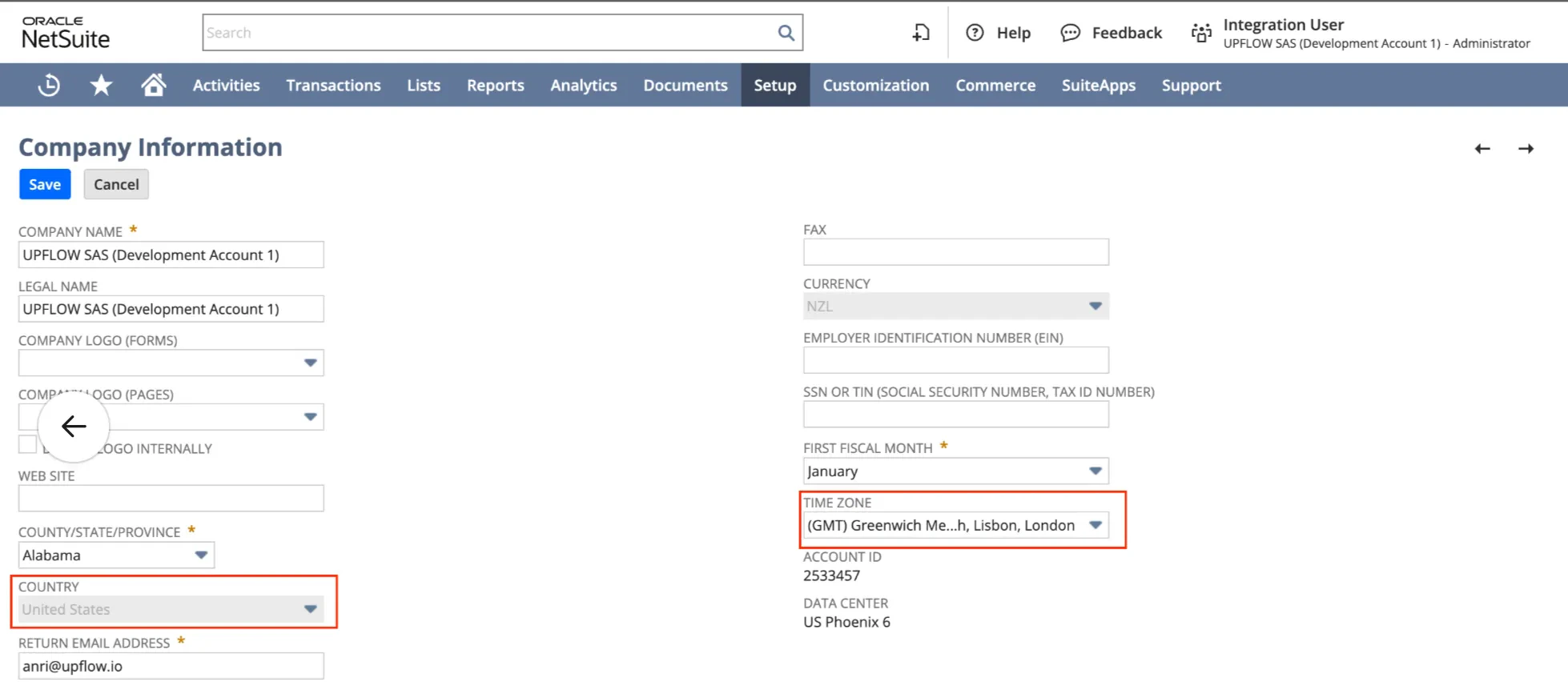
* **Country:** Upflow uses the fields located in the Company Information page.
 ## Customer hierarchy
In NetSuite, the parent/child customer relationship allows for hierarchical organization of customers. This relationship is imported into Upflow with some exceptions.
If you would like to perform the collection at the parent level, only for the parent's invoices, we can disable the hierarchy synchronization. Please contact us at [support@upflow.io](mailto:support@upflow.io) to do so.
⚠️ Note: Upflow only **supports 2 levels of customer hierarchy** (i.e. parent-child).
Any “grandchildren,” therefore, will appear as though they are directly linked to the top-level parent.
Here “Example parent company” has two children: “Example first child” and “Example second child”. “Example first child” itself has a child: “Example grandchild.”
## Customer hierarchy
In NetSuite, the parent/child customer relationship allows for hierarchical organization of customers. This relationship is imported into Upflow with some exceptions.
If you would like to perform the collection at the parent level, only for the parent's invoices, we can disable the hierarchy synchronization. Please contact us at [support@upflow.io](mailto:support@upflow.io) to do so.
⚠️ Note: Upflow only **supports 2 levels of customer hierarchy** (i.e. parent-child).
Any “grandchildren,” therefore, will appear as though they are directly linked to the top-level parent.
Here “Example parent company” has two children: “Example first child” and “Example second child”. “Example first child” itself has a child: “Example grandchild.”
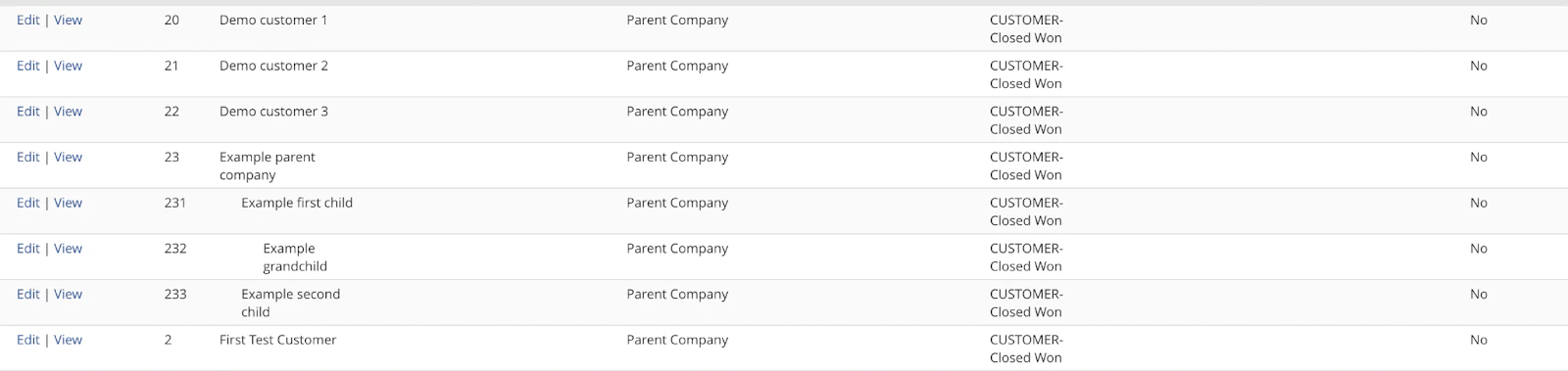 The image below shows how this relationship is reflected in Upflow.
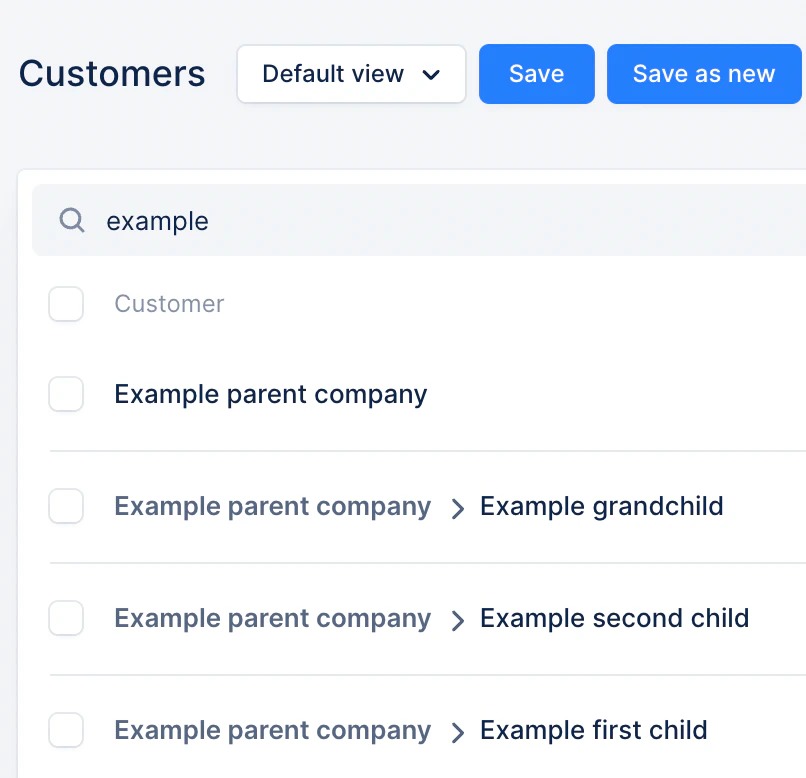 When looking at the customer details page in NetSuite, a field “Parent company” is present with a link to the direct parent:
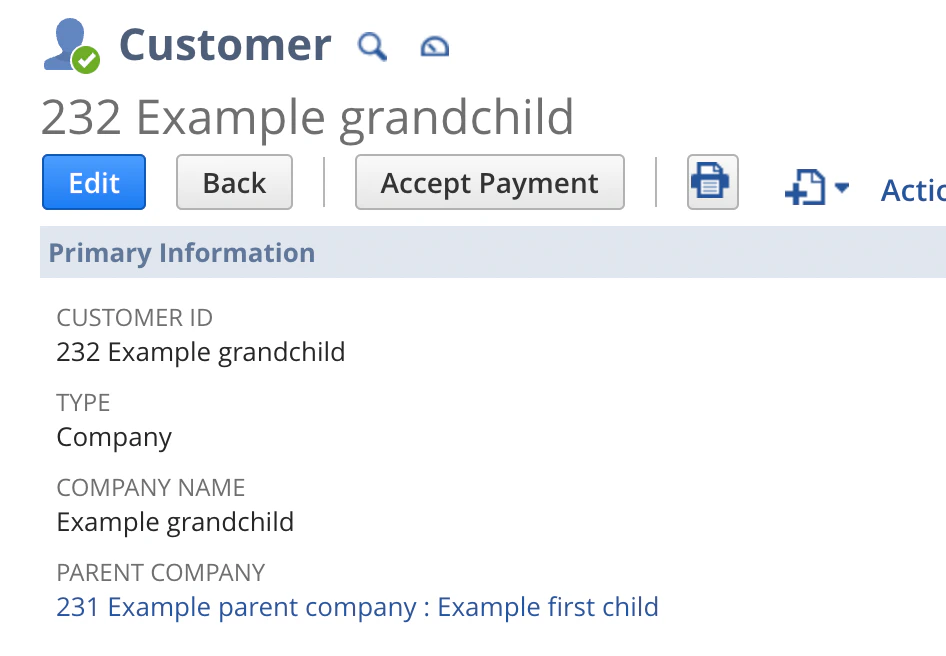 Here is the equivalent in Upflow:
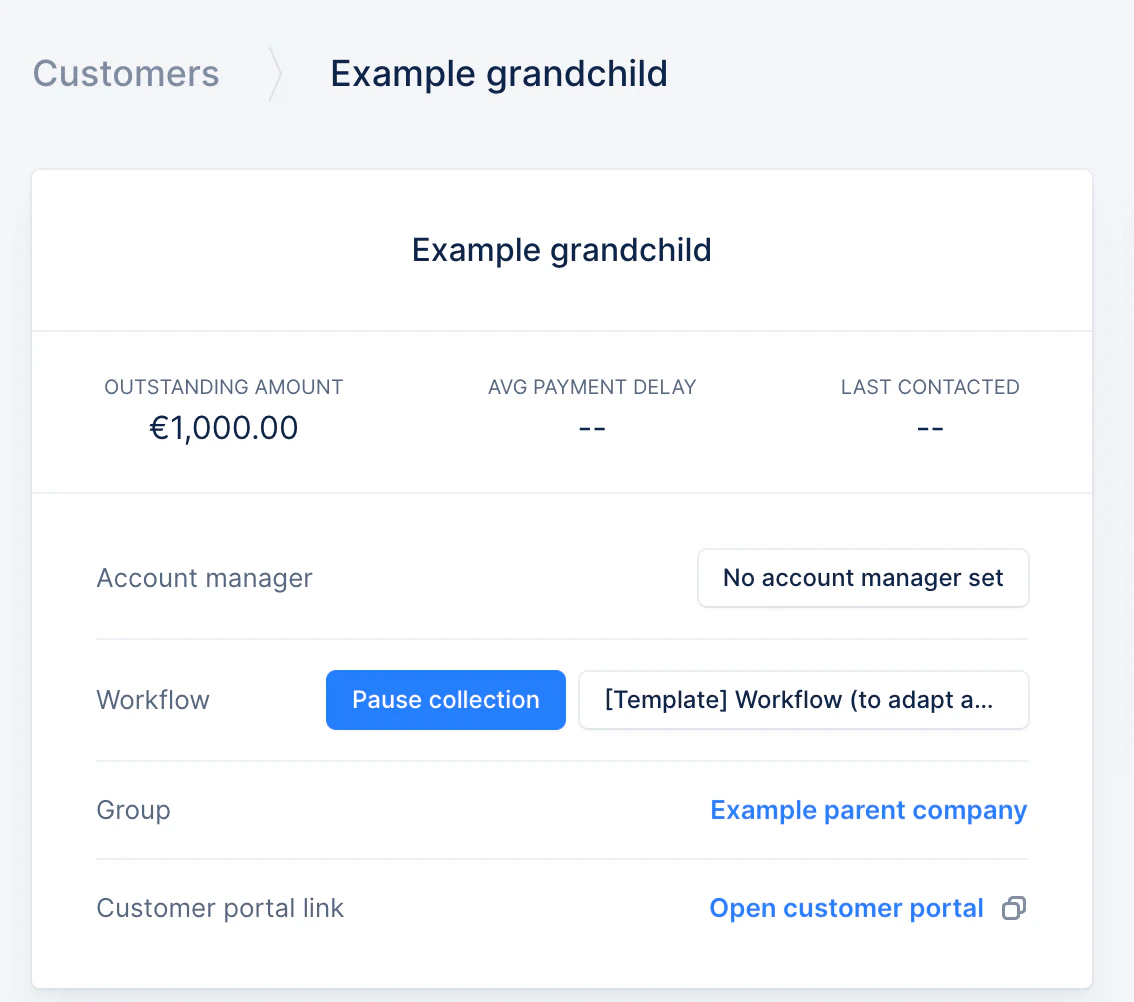 In Upflow the “group” is a link to the top-level parent customer.
**Note on balances:** In NetSuite, the balance shown on the customer does not include the balance of children by default, but **in Upflow it does. So the user should not expect to see the same balance in Upflow and NetSuite when the customer has children.** On the other hand, when looking at children or at customers without any children, the balances should match.
### Inactive Customers
If your customers are marked as Inactive in NetSuite, they will be excluded from the initial synchronization with Upflow. If a customer is marked Active later, they will then be synced into Upflow.
In Upflow the “group” is a link to the top-level parent customer.
**Note on balances:** In NetSuite, the balance shown on the customer does not include the balance of children by default, but **in Upflow it does. So the user should not expect to see the same balance in Upflow and NetSuite when the customer has children.** On the other hand, when looking at children or at customers without any children, the balances should match.
### Inactive Customers
If your customers are marked as Inactive in NetSuite, they will be excluded from the initial synchronization with Upflow. If a customer is marked Active later, they will then be synced into Upflow.
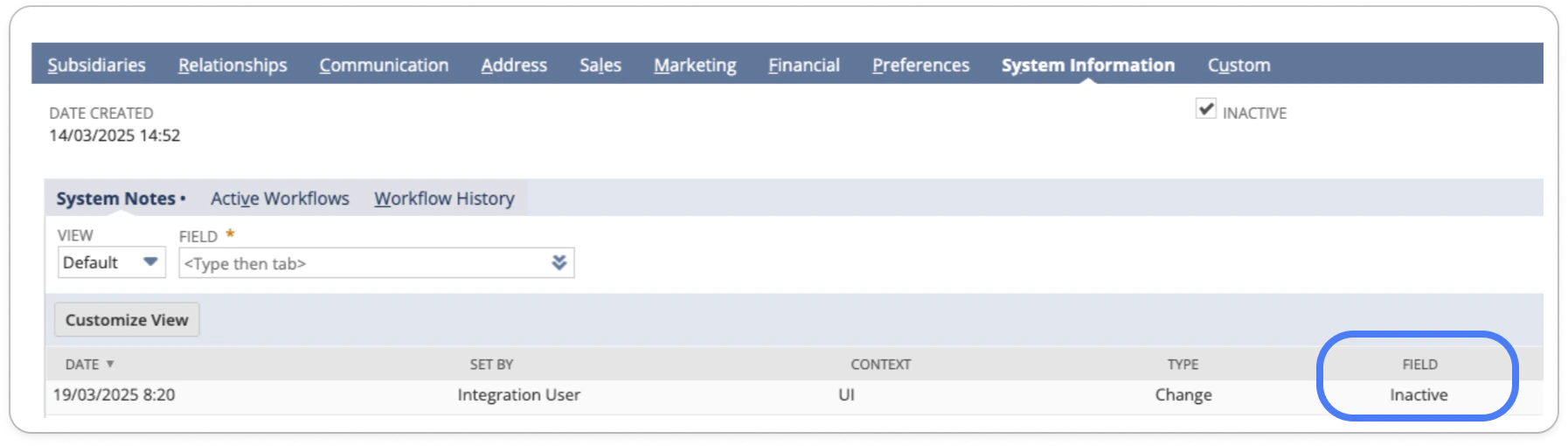 *If your NetSuite subsidiary was synced into Upflow before March 21st, 2025, and you have inactive customers in Upflow, you can then refer to the below section.*
## Excluding customers from Upflow - Initial sync
Customer exclusion means the customer itself and its meta-data (name, etc.) will be in Upflow (but invisible) but none of its associated data (invoices, transactions, etc.).
With Upflow, you can exclude customers natively as part of your NetSuite integration or directly from your [Upflow’s settings](https://app.upflow.io/organization/-/settings/integrations).
### Specific customers
To **exclude customers natively from your NetSuite sync** , Upflow filters them based on a specific value in the standard “category” field. Please [submit a support request](https://support.upflow.io/hc/en-us/requests/new) with a file listing all customers to exclude (Name/External ID/Upflow ID).
* This is only compatible with the standard [NetSuite customer category field](https://docs.oracle.com/en/cloud/saas/netsuite/ns-online-help/section_N3201309.html).
* This method is ideal for large datasets (10,000+ customers).
* Using this exclusion method speeds up the **initial sync** , as excluded customers' data is never imported into Upflow.
* However, the **incremental sync** performance is not affected. The integration reads all changes to the NetSuite instance and then decides which information to discard, after it’s been pulled from NetSuite.
### Inactive customers
If your customers are marked as Inactive in NetSuite, they will be excluded from the initial synchronization with Upflow. If a customer is marked Active later, they will then be synced into Upflow.
*(1) If your NetSuite subsidiary was synced into Upflow before March 21st, 2025, and you have inactive customers in Upflow, you can then refer to the below section.*
*(2) If an active customer already synced into Upflow as active becomes inactive in NetSuite, they will be automatically excluded from Upflow.*
## Exclude customers - NetSuite synced to Upflow
If your NetSuite subsidiary is already synced to Upflow, you have three options to exclude customers:
1. From your Upflow settings > Integrations, where individual customers can be selected (max 25).
2. Using [smart rules](/en-us/collection-and-collaboration/smart-rules/smart-rules) and the "Exclude from Upflow" action type.
3. Prepare a CSV file, containing the customers names + external IDs + Upflow IDs. Share this file with our Support [through this form](https://support.upflow.io/hc/en-us/requests/new).
⚠️ Note: Once you have excluded a customer, you cannot re-include them. This action is permanent.\*
You can learn more about excluding customers directly in Upflow following the initial sync [here](/en-us/core-entities/customers/exclude-customers).
## Customer contacts
Upflow imports the following information from NetSuite for customer contacts:
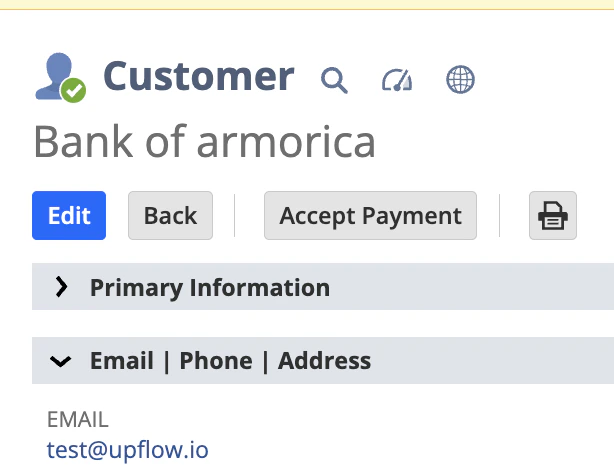
* the “email” field of the customer
* the contacts declared in the “Relationships” tab of the customer when their company is the same as the customer
⚠️ Note: If the company field is not filled for a contact, they will not be imported by Upflow.
### Main contact
The **main contact** is set for contacts with the NetSuite role “**Primary Contact** ,” or by using the email field of the customer otherwise.
*If your NetSuite subsidiary was synced into Upflow before March 21st, 2025, and you have inactive customers in Upflow, you can then refer to the below section.*
## Excluding customers from Upflow - Initial sync
Customer exclusion means the customer itself and its meta-data (name, etc.) will be in Upflow (but invisible) but none of its associated data (invoices, transactions, etc.).
With Upflow, you can exclude customers natively as part of your NetSuite integration or directly from your [Upflow’s settings](https://app.upflow.io/organization/-/settings/integrations).
### Specific customers
To **exclude customers natively from your NetSuite sync** , Upflow filters them based on a specific value in the standard “category” field. Please [submit a support request](https://support.upflow.io/hc/en-us/requests/new) with a file listing all customers to exclude (Name/External ID/Upflow ID).
* This is only compatible with the standard [NetSuite customer category field](https://docs.oracle.com/en/cloud/saas/netsuite/ns-online-help/section_N3201309.html).
* This method is ideal for large datasets (10,000+ customers).
* Using this exclusion method speeds up the **initial sync** , as excluded customers' data is never imported into Upflow.
* However, the **incremental sync** performance is not affected. The integration reads all changes to the NetSuite instance and then decides which information to discard, after it’s been pulled from NetSuite.
### Inactive customers
If your customers are marked as Inactive in NetSuite, they will be excluded from the initial synchronization with Upflow. If a customer is marked Active later, they will then be synced into Upflow.
*(1) If your NetSuite subsidiary was synced into Upflow before March 21st, 2025, and you have inactive customers in Upflow, you can then refer to the below section.*
*(2) If an active customer already synced into Upflow as active becomes inactive in NetSuite, they will be automatically excluded from Upflow.*
## Exclude customers - NetSuite synced to Upflow
If your NetSuite subsidiary is already synced to Upflow, you have three options to exclude customers:
1. From your Upflow settings > Integrations, where individual customers can be selected (max 25).
2. Using [smart rules](/en-us/collection-and-collaboration/smart-rules/smart-rules) and the "Exclude from Upflow" action type.
3. Prepare a CSV file, containing the customers names + external IDs + Upflow IDs. Share this file with our Support [through this form](https://support.upflow.io/hc/en-us/requests/new).
⚠️ Note: Once you have excluded a customer, you cannot re-include them. This action is permanent.\*
You can learn more about excluding customers directly in Upflow following the initial sync [here](/en-us/core-entities/customers/exclude-customers).
## Customer contacts
Upflow imports the following information from NetSuite for customer contacts:
* the “email” field of the customer
* the contacts declared in the “Relationships” tab of the customer when their company is the same as the customer
⚠️ Note: If the company field is not filled for a contact, they will not be imported by Upflow.
### Main contact
The **main contact** is set for contacts with the NetSuite role “**Primary Contact** ,” or by using the email field of the customer otherwise.
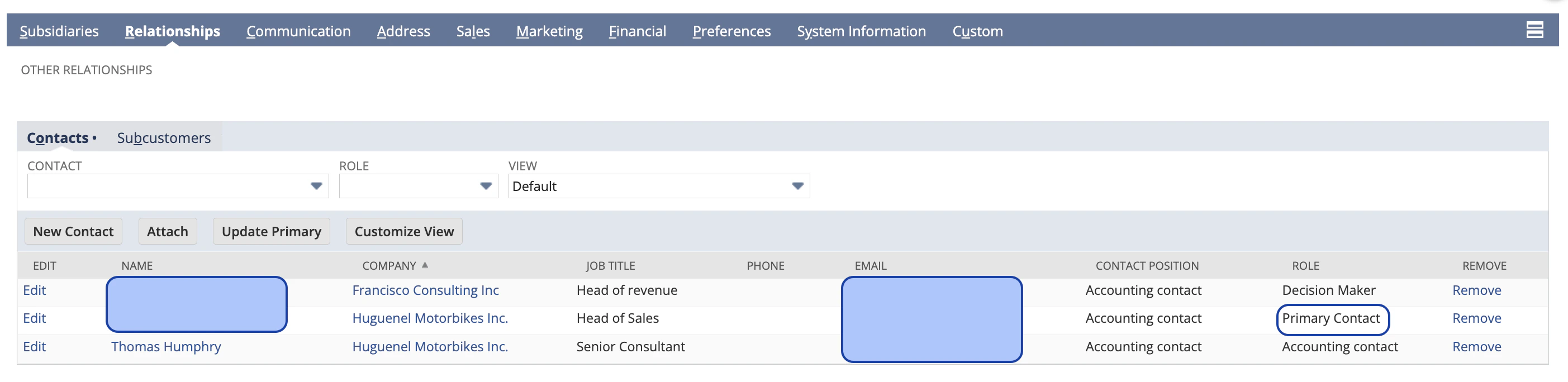 In the event that there are multiple “primary contacts” in NetSuite, Upflow will pick one contact to be the main one based on the order in which the contacts are imported.
## Notes:
* Upflow excludes **inter-company customers** from the import from NetSuite when they are defined as those with **representingSubsidiary** value.
* Upflow allows the import of **customer custom fields** as contacts. If you have, for example, "Client billing email address" as a customer custom field in NetSuite, you can import them under certain conditions (learn more: [Import contacts from custom fields](/en-us/core-entities/contacts/import-contacts-from-custom-fields)).
* If you integrate with **Salesforce** as well as NetSuite, the Salesforce contacts and account owners will override those from NetSuite.
In the event that there are multiple “primary contacts” in NetSuite, Upflow will pick one contact to be the main one based on the order in which the contacts are imported.
## Notes:
* Upflow excludes **inter-company customers** from the import from NetSuite when they are defined as those with **representingSubsidiary** value.
* Upflow allows the import of **customer custom fields** as contacts. If you have, for example, "Client billing email address" as a customer custom field in NetSuite, you can import them under certain conditions (learn more: [Import contacts from custom fields](/en-us/core-entities/contacts/import-contacts-from-custom-fields)).
* If you integrate with **Salesforce** as well as NetSuite, the Salesforce contacts and account owners will override those from NetSuite.