> ## Documentation Index
> Fetch the complete documentation index at: https://docs.upflow.io/llms.txt
> Use this file to discover all available pages before exploring further.
# Connect my NetSuite account to Upflow - first synchronization
> Step-by-step guide to connecting NetSuite to Upflow: required permissions, role setup, integration token, and what gets synced from day one.
Let's take 10 minutes to connect your NetSuite instance to Upflow. As soon as your financial objects (invoices, customers, contacts...) are synced with your organization, you will be able to initiate your cash collection!
##### Before kicking off the configuration of the integration, please confirm you have:
* admin rights on NetSuite
* your user profile is English US
* created an Organization on Upflow
Note: Upflow only supports NetSuite OneWorld instances.
# Ensure my NetSuite setup is compliant
Before connecting NetSuite to Upflow, a few features need to be enabled in your NetSuite account. You can follow the steps below or use the interactive guide.
Start by accessing the [**Setup**](https://system.netsuite.com/app/setup/features.nl?whence=) page of your NetSuite configuration panel:
 ...and click on SuiteCloud (in the features menu):
 Find and enable the following options by ticking their boxes.
| Section | Feature |
| ----------------------- | -------------------------------------------------------------------------------------------------------------------------------------------------------------------------------------------------------------------------------------------------------------------------------------------------------------------------------------------------------------------------------------------------------------------------------------------------------------------------------------------------------------------------------------------------------------------------------------------------------------------------------------------------------------------------------------------------------------------------------------------------------------------------------------------------------------------------------------------------------------------------------------------------------------------------------------------------------------------------------------------------------------------------------------------------------------------------------------------------------------------------------------------------------------------------------------------------------------------------------------------------------------------------------------------------------------------------------------------------------------------------------------------------------------------------------------------------------- |
| SuiteScript | Client SuiteScript |
| | Server SuiteScript
Find and enable the following options by ticking their boxes.
| Section | Feature |
| ----------------------- | -------------------------------------------------------------------------------------------------------------------------------------------------------------------------------------------------------------------------------------------------------------------------------------------------------------------------------------------------------------------------------------------------------------------------------------------------------------------------------------------------------------------------------------------------------------------------------------------------------------------------------------------------------------------------------------------------------------------------------------------------------------------------------------------------------------------------------------------------------------------------------------------------------------------------------------------------------------------------------------------------------------------------------------------------------------------------------------------------------------------------------------------------------------------------------------------------------------------------------------------------------------------------------------------------------------------------------------------------------------------------------------------------------------------------------------------------------- |
| SuiteScript | Client SuiteScript |
| | Server SuiteScript 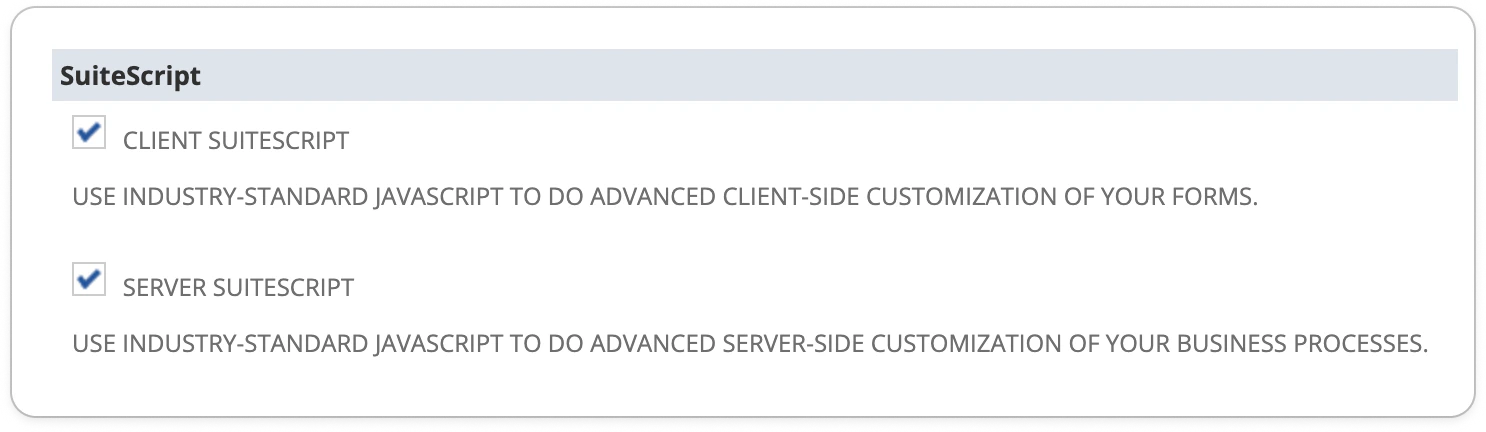 |
| SuiteTalk (WebServices) | SOAP Webservices |
| | REST Webservices
|
| SuiteTalk (WebServices) | SOAP Webservices |
| | REST Webservices 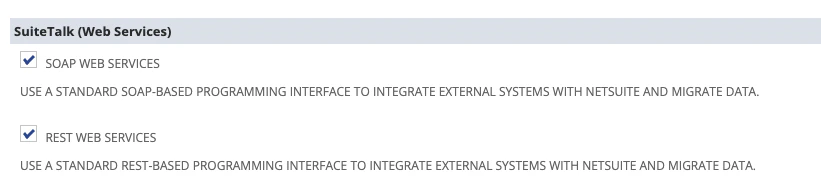 |
| Manage authentication | Token-Based Authentication
|
| Manage authentication | Token-Based Authentication  |
Click on **Save** at the bottom of the page.
Still in the Setup, access the **Analytics** page from the top bar and enable:
| Section | Feature |
| ----------------------- | -------------------------------------------------------------------------------------------------------------------------------------------------------------------------------------------------------------------------------------------------------------------------------------------------------------------------------------------------------------------------------------------------------------------------------------------------------------------------------------------------------------------------------------------------------------------------------------------------------------------------------------------------------------------------------------------------------------------------------------------------------------------------------------------------------------------------------------------------------------------------------------------------------------------------------------------------------------------------------------------------------------------------------------------------------------------------------------------------------------------------------------------------------------------------------------------------------------------------------------------------------------------------------------------------------------------------------------------------------------------------------------------------------------------------------------------------- |
| SuiteAnalytics Workbook | SuiteAnalytics Workbook
|
Click on **Save** at the bottom of the page.
Still in the Setup, access the **Analytics** page from the top bar and enable:
| Section | Feature |
| ----------------------- | -------------------------------------------------------------------------------------------------------------------------------------------------------------------------------------------------------------------------------------------------------------------------------------------------------------------------------------------------------------------------------------------------------------------------------------------------------------------------------------------------------------------------------------------------------------------------------------------------------------------------------------------------------------------------------------------------------------------------------------------------------------------------------------------------------------------------------------------------------------------------------------------------------------------------------------------------------------------------------------------------------------------------------------------------------------------------------------------------------------------------------------------------------------------------------------------------------------------------------------------------------------------------------------------------------------------------------------------------------------------------------------------------------------------------------------------------- |
| SuiteAnalytics Workbook | SuiteAnalytics Workbook  |
Once again, don't forget to click on ***Save***!
***
💡 You can use shortcuts to speed up the search for a feature: Windows (ctrl+f) or macOS (cmd+f).
***
# Install Upflow SuiteApp
You are about to grant Upflow access to the information to be displayed across your organization and used for your cash collection (trigger your workflows, reach out to the right parties, etc).
|
Once again, don't forget to click on ***Save***!
***
💡 You can use shortcuts to speed up the search for a feature: Windows (ctrl+f) or macOS (cmd+f).
***
# Install Upflow SuiteApp
You are about to grant Upflow access to the information to be displayed across your organization and used for your cash collection (trigger your workflows, reach out to the right parties, etc).
...and click on SuiteCloud (in the features menu):
Search **Upflow** in your NetSuite [Suiteapp marketplace](https://docs.oracle.com/en/cloud/saas/netsuite/ns-online-help/book_1540487155.html) (or access [this link](https://system.netsuite.com/suiteapp/ui/marketplace.nl#/app?id=com.upflow.upflow)).
Click **Install** to launch the process, and follow the guidelines until its completion (confirmed by a green checkbox displayed on the right hand of your screen).
 If you get an error when clicking Install, check the above features were enabled first in the Setup tab.
## Configure your integration
**Step 1 — Assign the Upflow Basic role**
[Assign the **Upflow Basic role**](https://docs.oracle.com/en/cloud/saas/netsuite/ns-online-help/section_N897798.html#:~:text=To%20assign%20one%20or%20more%20roles%20to%20an%20employee%3A\&text=Click%20the%20Access%20subtab.,a%20role%20for%20this%20employee.) to the teammate of your choice.
* **This user must be Admin in NetSuite**
* **Their** [**language settings**](https://docs.oracle.com/en/cloud/saas/netsuite/ns-online-help/section_1543591052.html#To-enable-multiple-languages%3A) **must be set to English US on NetSuite. Otherwise, sync issues may occur as a result.**
If you get an error when clicking Install, check the above features were enabled first in the Setup tab.
## Configure your integration
**Step 1 — Assign the Upflow Basic role**
[Assign the **Upflow Basic role**](https://docs.oracle.com/en/cloud/saas/netsuite/ns-online-help/section_N897798.html#:~:text=To%20assign%20one%20or%20more%20roles%20to%20an%20employee%3A\&text=Click%20the%20Access%20subtab.,a%20role%20for%20this%20employee.) to the teammate of your choice.
* **This user must be Admin in NetSuite**
* **Their** [**language settings**](https://docs.oracle.com/en/cloud/saas/netsuite/ns-online-help/section_1543591052.html#To-enable-multiple-languages%3A) **must be set to English US on NetSuite. Otherwise, sync issues may occur as a result.**
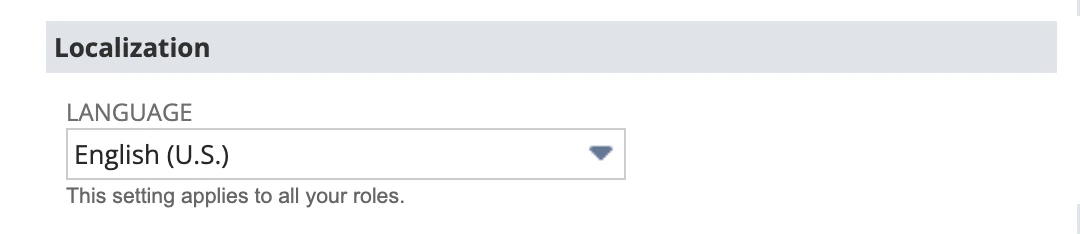 We recommend using an Admin generic account dedicated to integrations or your Finance process, to avoid disruption with the sync if the related user leaves the company, for example.
**Step 2 — Create an Access Token**
Access [**this page**](https://system.netsuite.com/app/setup/accesstoken.nl) and click on **New Access Token** before picking **Upflow SuiteApp**. Fill in the following parameters:
We recommend using an Admin generic account dedicated to integrations or your Finance process, to avoid disruption with the sync if the related user leaves the company, for example.
**Step 2 — Create an Access Token**
Access [**this page**](https://system.netsuite.com/app/setup/accesstoken.nl) and click on **New Access Token** before picking **Upflow SuiteApp**. Fill in the following parameters:
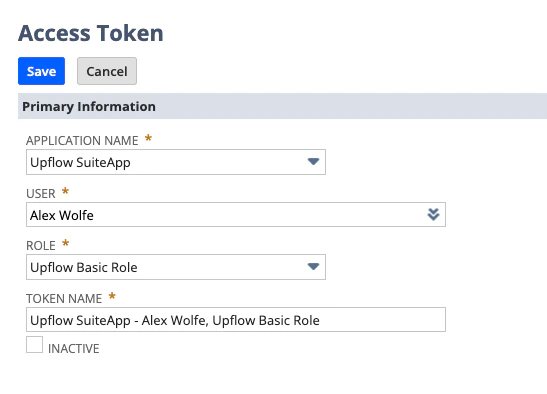 * **Application name**: Pick **Upflow SuiteApp**
  * **User**: Select the user you just assigned Upflow Basic Role.
* **Role**: Upflow Basic Role (this option will not be available before you pick the user).
* **Token name**: Write one that suits you.
**Step 3 — Save your credentials**
Click on ***Save*** to finalize the process and display your API key-related information (**Access token ID** and **Access token secret**). Write them down: you will be asked to provide them during your Upflow onboarding and once the page is closed or refreshed, they'll be lost.
# Almost there
* **User**: Select the user you just assigned Upflow Basic Role.
* **Role**: Upflow Basic Role (this option will not be available before you pick the user).
* **Token name**: Write one that suits you.
**Step 3 — Save your credentials**
Click on ***Save*** to finalize the process and display your API key-related information (**Access token ID** and **Access token secret**). Write them down: you will be asked to provide them during your Upflow onboarding and once the page is closed or refreshed, they'll be lost.
# Almost there
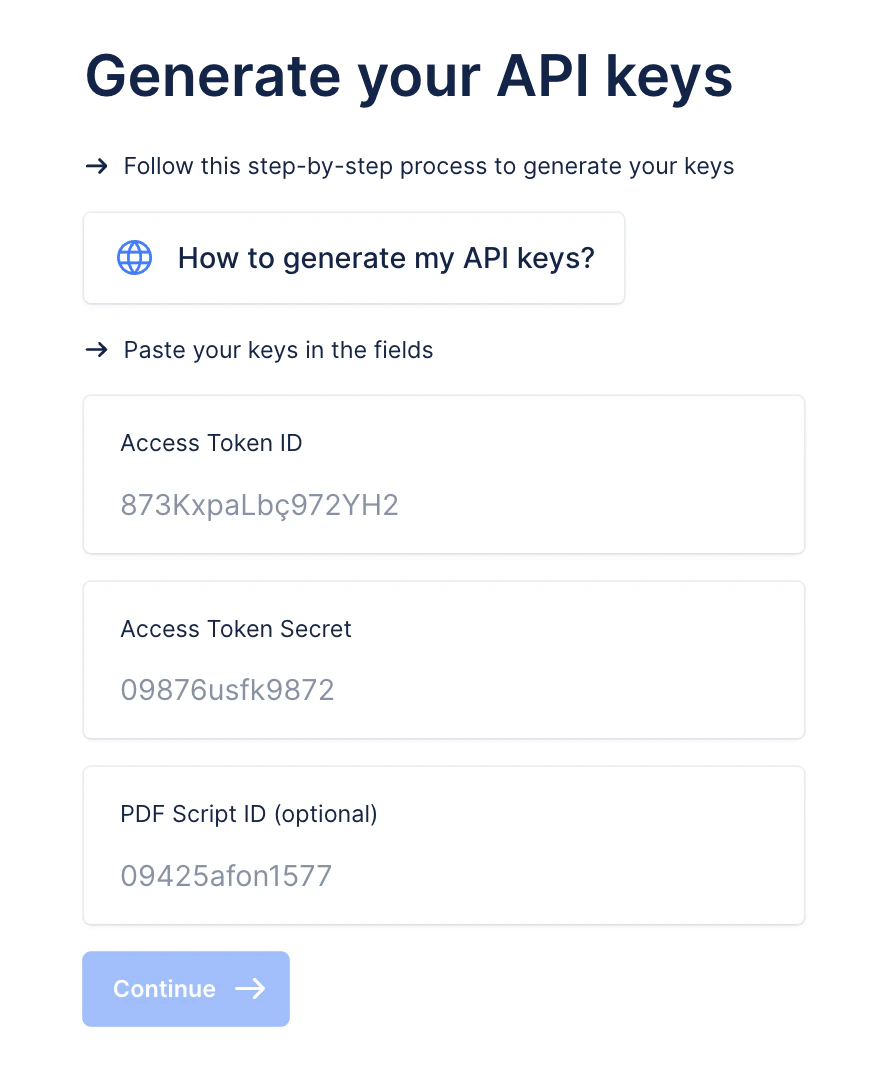 Go back to your Upflow organization and select **NetSuite** as the tool you want to integrate it with. When requested, share your **NetSuite account ID**, before filling in the **Access Token ID** and **Access Token Secret** you generated earlier.
The **PDF Script ID** is a legacy from a former version of our integration and is now automatically taken care of by our app. You thus do not need to populate it anymore.
Time to move to setting the objects you want your team to access on Upflow!
# Include your subsidiaries
To make the most of the features available to you in Upflow, you should configure Upflow following the 1:1 rule, i.e. 1 Subsidiary = 1 Organization. This means that if you have 3 subsidiaries in NetSuite, you should create 3 Organizations in Upflow. We also recommend creating a consolidated parent organization in Upflow for reporting purposes.
Perform the same NetSuite setup for each organization in Upflow, selecting the corresponding subsidiary when presented with the page above. You will manage your workflows and actions across your separated Upflow organizations. Follow the steps outlined above to create multiple organizations.
To add a new organization follow the steps outlined [here](/en-us/upflow-configuration/organization-configuration/manage-multiple-organizations).
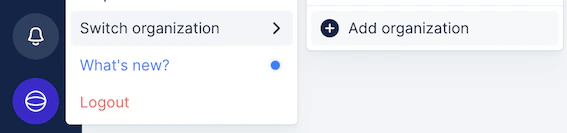 If you want to add or remove subsidiaries, submit a Support request at the top. You can learn more about NetSuite subsidiaries in this help article: [NetSuite Subsidiaries in Upflow](/en-us/integrations/netsuite/subsidiaries).
Click on **Continue,** and let us guide you through the end of the process.
Et voilà ! The sync is now launched and can take up to several hours. In the meantime, you can invite your teammates to join your organization or configure your first workflow!
# Upgrading your app
Follow the same steps as during your initial installation. The only difference lies in the Marketplace button, now named **Upgrade**.
If you want to add or remove subsidiaries, submit a Support request at the top. You can learn more about NetSuite subsidiaries in this help article: [NetSuite Subsidiaries in Upflow](/en-us/integrations/netsuite/subsidiaries).
Click on **Continue,** and let us guide you through the end of the process.
Et voilà ! The sync is now launched and can take up to several hours. In the meantime, you can invite your teammates to join your organization or configure your first workflow!
# Upgrading your app
Follow the same steps as during your initial installation. The only difference lies in the Marketplace button, now named **Upgrade**.