> ## Documentation Index
> Fetch the complete documentation index at: https://docs.upflow.io/llms.txt
> Use this file to discover all available pages before exploring further.
# Export Upflow data to HubSpot
> Push customer-level collection data from Upflow to HubSpot company properties so your commercial team always sees the latest AR status on each account.
The HubSpot integration is currently in **beta**. [Contact our support team](/en-us/essentials/get-started/contact-our-support-team) to request access.
## How does it work?
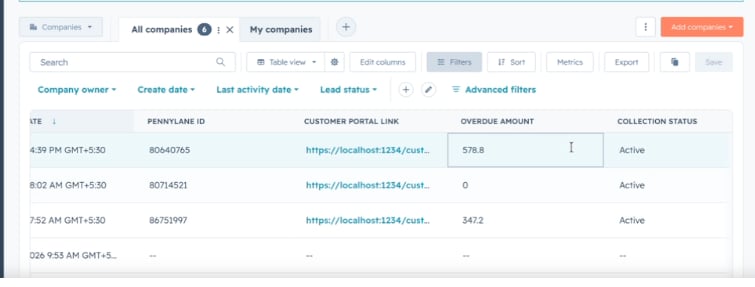
Once HubSpot and Upflow are [connected](/en-us/integrations/hubspot/connect), you can export collection data from Upflow to HubSpot so your team sees each customer's AR situation right inside their CRM.
Only information stored at the **customer** level can be exported, and it's written to the corresponding HubSpot **company**.
To export a field:
1. Create the destination property on the company object in HubSpot.
2. Back in Upflow, the property becomes available for mapping after a few minutes.
3. Map the Upflow field to the HubSpot property and save — the sync starts.
If you disable a field's sync in Upflow, the property is no longer updated — but it isn't deleted in HubSpot.
 Your AR data then appears on the matching HubSpot company, alongside your CRM data.
 ## Customer fields available for export
These are the same fields Upflow writes back for the Salesforce integration.
| Field | Description | HubSpot property type |
| --------------------------- | ----------------------------------------------- | ------------------------------ |
| Outstanding amount | Outstanding amount in the org currency | Number |
| Overdue amount | Overdue amount in the org currency | Number |
| Due amount | Due amount in the org currency | Number |
| Overdue count | Number of overdue invoices | Number |
| Due count | Number of due invoices | Number |
| Average payment delay | Average payment delay in days | Number |
| Rating | Customer rating | Single-line text |
| Collection status | Active or Paused | Single-line text |
| Customer portal URL | Link to the customer portal | Multi-line text |
| Customer details page URL | Link to the customer page in Upflow | Multi-line text or URL |
| Saved payment method | Saved payment method type | Single-line text |
| Saved payment method status | Last payment status of the saved payment method | Single-line text |
| Text custom field | A text customer custom field | Single-line or multi-line text |
| Select custom field | A single-select customer custom field | Dropdown select |
| Multi-select custom field | A multi-select customer custom field | Multiple checkboxes |
| Date custom field | A date customer custom field | Date picker |
| Boolean custom field | A true/false customer custom field | Single checkbox |
| Number custom field | A number customer custom field | Number |
The **Customer portal URL** is refreshed periodically so the link your team opens from HubSpot stays valid. All other fields update automatically as your AR data changes in Upflow.
## Customer fields available for export
These are the same fields Upflow writes back for the Salesforce integration.
| Field | Description | HubSpot property type |
| --------------------------- | ----------------------------------------------- | ------------------------------ |
| Outstanding amount | Outstanding amount in the org currency | Number |
| Overdue amount | Overdue amount in the org currency | Number |
| Due amount | Due amount in the org currency | Number |
| Overdue count | Number of overdue invoices | Number |
| Due count | Number of due invoices | Number |
| Average payment delay | Average payment delay in days | Number |
| Rating | Customer rating | Single-line text |
| Collection status | Active or Paused | Single-line text |
| Customer portal URL | Link to the customer portal | Multi-line text |
| Customer details page URL | Link to the customer page in Upflow | Multi-line text or URL |
| Saved payment method | Saved payment method type | Single-line text |
| Saved payment method status | Last payment status of the saved payment method | Single-line text |
| Text custom field | A text customer custom field | Single-line or multi-line text |
| Select custom field | A single-select customer custom field | Dropdown select |
| Multi-select custom field | A multi-select customer custom field | Multiple checkboxes |
| Date custom field | A date customer custom field | Date picker |
| Boolean custom field | A true/false customer custom field | Single checkbox |
| Number custom field | A number customer custom field | Number |
The **Customer portal URL** is refreshed periodically so the link your team opens from HubSpot stays valid. All other fields update automatically as your AR data changes in Upflow.