> ## Documentation Index
> Fetch the complete documentation index at: https://docs.upflow.io/llms.txt
> Use this file to discover all available pages before exploring further.
# Ad hoc actions
> Create standalone tasks and reminders in Upflow outside any workflow to track manual follow-ups, team coordination or one-off collection actions on any customer or invoice.
Ad hoc actions allow you to create standalone tasks and reminders in Upflow without needing a specific customer workflow or invoice status. Use them to manage follow-ups with specific customers, coordinate actions with your team, or track any collection-related task that doesn't fit into your automated workflows.
## What are ad hoc actions?
Ad hoc actions are manual actions you can create on demand. Unlike workflow actions that are automatically generated based on your collection workflow configuration, ad hoc actions give you the flexibility to:
* Create an ad hoc action for a specific customer or invoice
* Start from an existing template or write your own message
* Works with any invoice status
NB: Ad hoc actions **are taken into account** in the calculation of the workflows’ minimum contact delay.
### Ad hoc actions vs. workflow actions
| Feature | Ad hoc actions | Workflow actions |
| ------------------- | -------------------------------------------------------------- | ------------------------------------------------ |
| **Creation** | Created manually by users | Generated automatically by workflows |
| **Use case** | One-off tasks, team coordination | Systematic collection process |
| **Requirements** | No specific invoice nor invoice status is needed | Requires active workflow and outstanding invoice |
| **Workflow impact** | **Do affect** the workflow’s minimum contact delay calculation | Respect the workflow minimum contact delay |
## When to use ad hoc actions
Ad hoc actions are ideal for:
* **Team coordination**: "Review credit limit for Customer X before their renewal"
* **Follow-up reminders**: "Call customer next week about payment plan discussion"
* **One-off tasks**: "Send thank you note after large payment received"
* **Investigation tasks**: "Research why invoice was disputed"
* **Internal reminders**: "Update payment terms in billing system"
* **Pre-emptive outreach**: "Contact customer before invoice becomes overdue"
**Tip:** For regular, systematic collection reminders, continue using your configured workflows. Use ad hoc actions for everything that falls outside your standard process.
## Creating an ad hoc action
### Step 1: Access ad hoc action creation
You can create ad hoc actions from several places in Upflow:
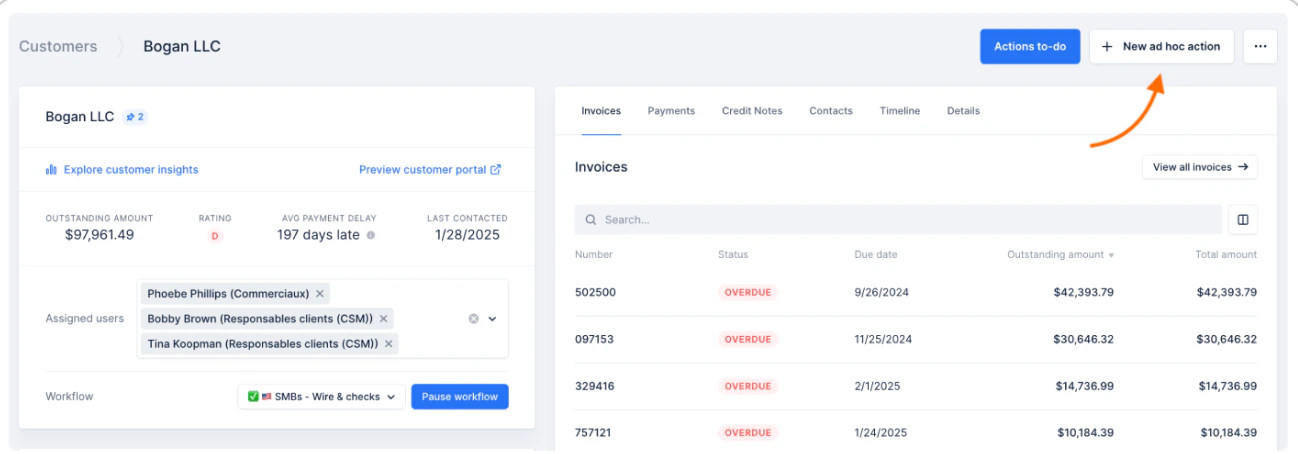
1. **From a customer detail page**: Click **"New ad hoc action"** at the top right of the page
2. **From an invoice detail page**: Click **"New ad hoc action"** at the top right of the page
**Where will the action appear?**
* **Customer-level** (created from the Customer detail page): visible in the **Customer timeline** only
* **Invoice-level** (created from the Invoice detail page): visible in the **Invoice timeline** and the related **Customer timeline**
 ### Step 2: Fill in action details
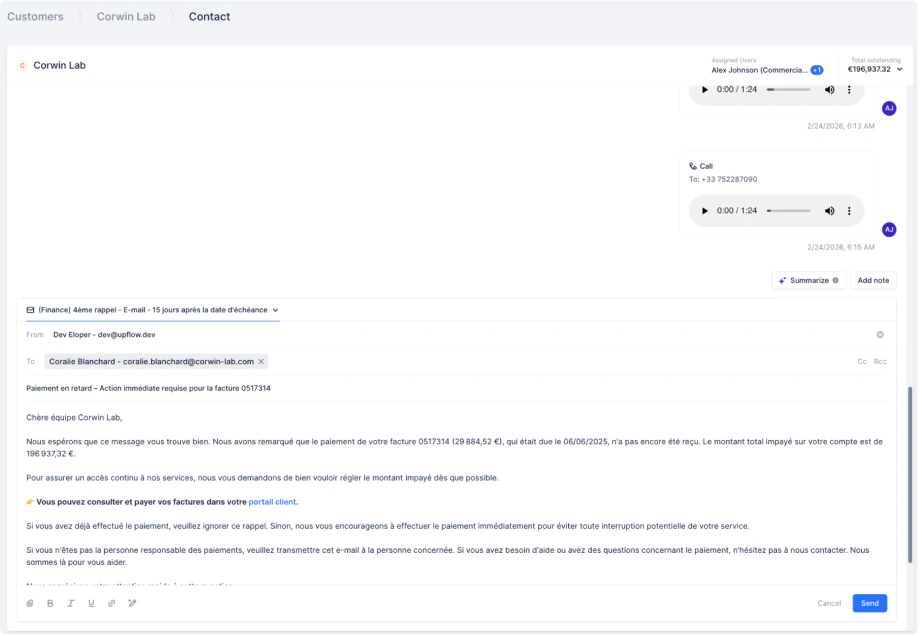
**Create ad hoc action**
Use an existing template to save time, or start from scratch:
* **Email**: Draft and send an email
* **Call**: Log a phone call
* **Task**: Create a general to-do item
* **SMS**: Send a text message
* **Letter**: Prepare postal mail
### Step 2: Fill in action details
**Create ad hoc action**
Use an existing template to save time, or start from scratch:
* **Email**: Draft and send an email
* **Call**: Log a phone call
* **Task**: Create a general to-do item
* **SMS**: Send a text message
* **Letter**: Prepare postal mail
 #### Add images to your email/letter
When creating an ad hoc email or letter, you have the ability to add images in-line.
To do so, you can either:
* Copy/paste an image in your email/letter body
* Drag the image from a file to your email/letter body
* Upload an image by clicking the dedicated icon
Note that while it's possible to proceed in ad hoc or manual actions, this is not yet possible in workflow steps or shared [Templates](/en-us/collection-and-collaboration/collaboration/templates).
Supported formats are: png, jpeg, gif and webp. Images have the same max file size as regular attachments: 15MB.
### Step 3: Execute immediately
* Click **"Send", “Done, or “Mark as completed”** (based on the action type) to perform the action right away
## Managing your ad hoc actions
### Viewing ad hoc actions
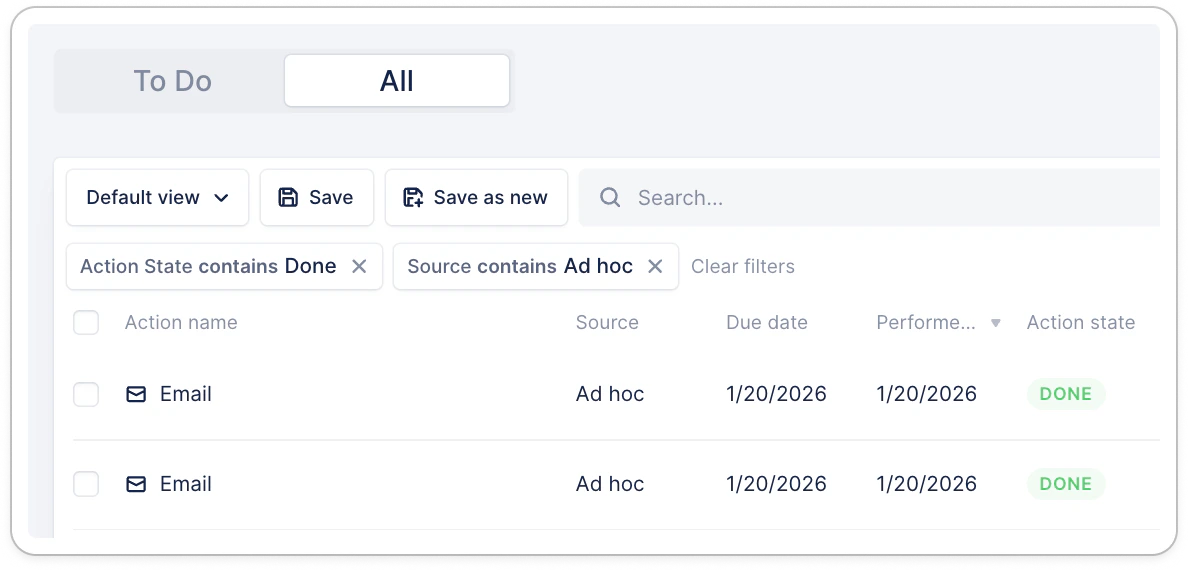
All ad hoc actions appear in your [Actions list view > All](https://app.upflow.io/organization/-/actions-list).
* Filter on “Source contains Ad hoc” for specific results. Add more filters based on your needs to narrow the displayed results.
#### Add images to your email/letter
When creating an ad hoc email or letter, you have the ability to add images in-line.
To do so, you can either:
* Copy/paste an image in your email/letter body
* Drag the image from a file to your email/letter body
* Upload an image by clicking the dedicated icon
Note that while it's possible to proceed in ad hoc or manual actions, this is not yet possible in workflow steps or shared [Templates](/en-us/collection-and-collaboration/collaboration/templates).
Supported formats are: png, jpeg, gif and webp. Images have the same max file size as regular attachments: 15MB.
### Step 3: Execute immediately
* Click **"Send", “Done, or “Mark as completed”** (based on the action type) to perform the action right away
## Managing your ad hoc actions
### Viewing ad hoc actions
All ad hoc actions appear in your [Actions list view > All](https://app.upflow.io/organization/-/actions-list).
* Filter on “Source contains Ad hoc” for specific results. Add more filters based on your needs to narrow the displayed results.
 ## Frequently asked questions
#### Who can create ad hoc actions?
All Upflow users with action permissions can create ad hoc actions (learn more: [Roles & Positions](/en-us/upflow-configuration/your-teams-access/invite-and-manage-your-organizations-users)).
#### Do ad hoc actions affect my workflows?
Yes. Ad hoc actions are taken into account in the calculation of the workflows’ minimum contact delay.
#### Can I bulk-create ad hoc actions?
Not currently. Each ad hoc action must be created individually. For bulk communications, use campaign actions instead (cf. [Action campaigns](/en-us/collection-and-collaboration/run-your-collection/action-campaigns)).
#### Can I assign an ad hoc action to a collaborator?
Not today. This is something we’d like to offer later.
#### Can I schedule an ad hoc action to be performed on a future date?
Not today. This is something we’d like to offer later.
## Frequently asked questions
#### Who can create ad hoc actions?
All Upflow users with action permissions can create ad hoc actions (learn more: [Roles & Positions](/en-us/upflow-configuration/your-teams-access/invite-and-manage-your-organizations-users)).
#### Do ad hoc actions affect my workflows?
Yes. Ad hoc actions are taken into account in the calculation of the workflows’ minimum contact delay.
#### Can I bulk-create ad hoc actions?
Not currently. Each ad hoc action must be created individually. For bulk communications, use campaign actions instead (cf. [Action campaigns](/en-us/collection-and-collaboration/run-your-collection/action-campaigns)).
#### Can I assign an ad hoc action to a collaborator?
Not today. This is something we’d like to offer later.
#### Can I schedule an ad hoc action to be performed on a future date?
Not today. This is something we’d like to offer later.