> ## Documentation Index
> Fetch the complete documentation index at: https://docs.upflow.io/llms.txt
> Use this file to discover all available pages before exploring further.
# Analytics - Filter and export your data
> Filter your Upflow Analytics view by date range, workflow, country, account manager, or custom fields, then export the data to CSV or Excel.
Your [Analytics list view](https://app.upflow.io/organization/-/analytics) allows you to monitor and filter your personalized data and export it to a CSV/Excel file.
## Filtering Analytics
 Use the filter button on the top right corner of the page to display specific data based on:
* A date range, up to 24 months
* Assigned users
* Workflow names
* Countries
* Languages
* Customer ratings
* Saved payment methods
* Saved payment methods status
* Customer [Custom fields](/en-us/core-entities/others/import-and-create-custom-fields-into-upflow)
* Text fields are not supported as Analytics filters
* Invoice custom fields are not yet available as Analytics filters
***
👉 The filters are cumulative. Have a try; apply several at once!
***
## Create new reports
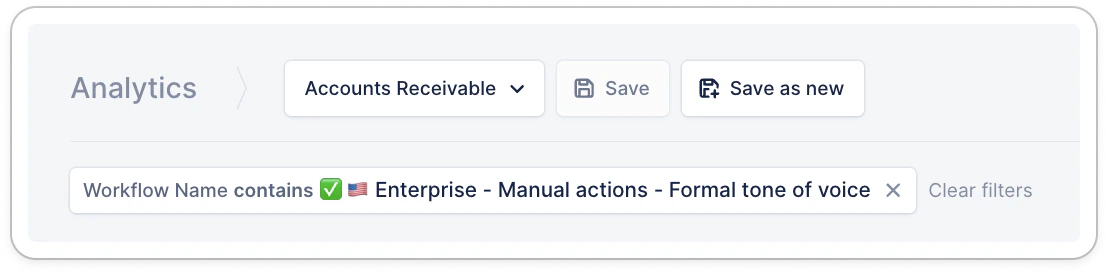
Once filters are applied, or widgets are edited, save this customization as a new report to find it easily next time!
Use the filter button on the top right corner of the page to display specific data based on:
* A date range, up to 24 months
* Assigned users
* Workflow names
* Countries
* Languages
* Customer ratings
* Saved payment methods
* Saved payment methods status
* Customer [Custom fields](/en-us/core-entities/others/import-and-create-custom-fields-into-upflow)
* Text fields are not supported as Analytics filters
* Invoice custom fields are not yet available as Analytics filters
***
👉 The filters are cumulative. Have a try; apply several at once!
***
## Create new reports
Once filters are applied, or widgets are edited, save this customization as a new report to find it easily next time!
 ## Exporting Analytics
Download the data you want to look into in two clicks.
## Exporting Analytics
Download the data you want to look into in two clicks.
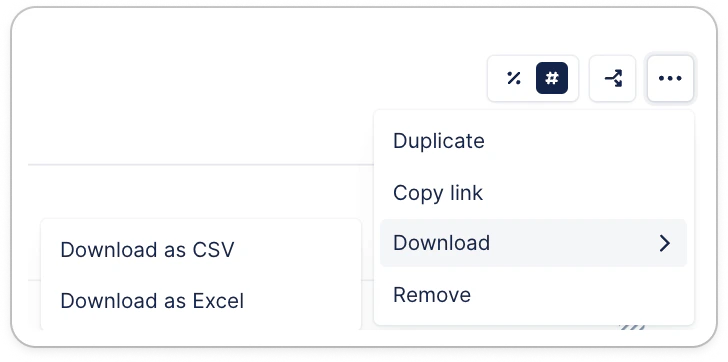 Hover over the graph you are interested in exporting (with or without applied filters) to display an *Download* button. Select your favorite format, and voilà!
***
👉 The applied filters will be reflected in the exported data.
***
Hover over the graph you are interested in exporting (with or without applied filters) to display an *Download* button. Select your favorite format, and voilà!
***
👉 The applied filters will be reflected in the exported data.
***